
The SmarteBuild supplier portal - a guide for suppliers
Builders use SmarteBuild to price houses, renovations and commercial jobs. When they price a job they pick products from SmarteBuild’s shared price list - and with the supplier portal, the products and prices in that list for your business are the ones you keep up to date. It is free for suppliers.
In the portal you can:
- List your products - sold each, per lineal metre, per square metre or any other unit - with your price excluding GST, a picture, and the date a new price starts.
- Mark made-to-order products as “quote only”. Builders then ask you for a price, with the sizes and the delivery suburb, and you answer in the portal.
- Set your freight by state and postcode, so builders see what delivery to their site costs.
- Load or update many products at once from a spreadsheet.
- Add your colleagues, so the right people get builders’ price requests.
Getting started
Section titled “Getting started”Joining
Section titled “Joining”Ask the SmarteBuild team to set you up: email hello@smartebuild.com.au, call (07) 3397 8805, or use the form at smartebuild.com.au/suppliers-network. Tell us your business name and the name and email address of the person who will look after your catalogue. We send that person an email invitation.
Signing in
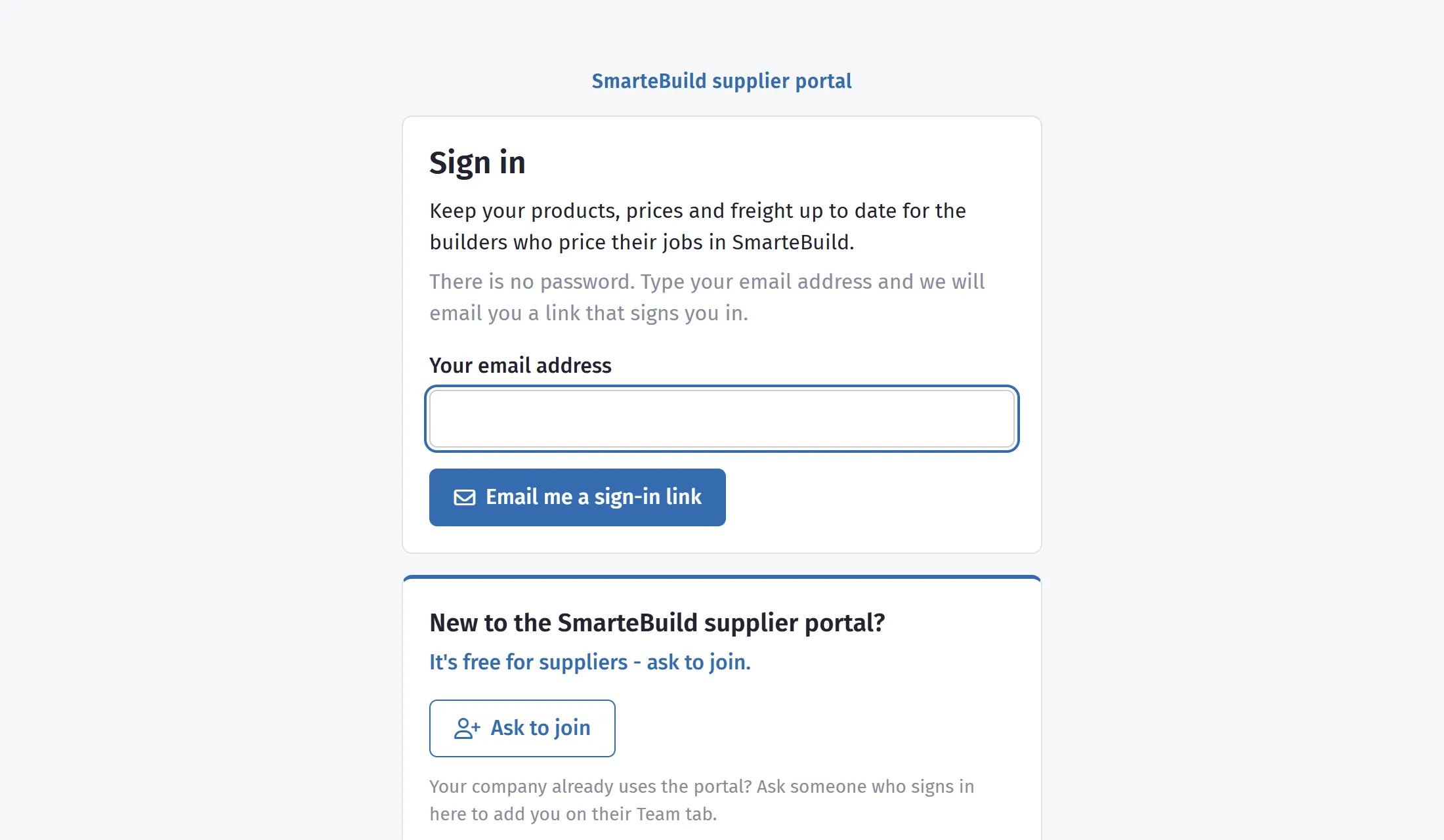
Section titled “Signing in”There is no password to remember.
- Open the invitation email and press Open the supplier portal. The link in an invitation works for 7 days.
- Next time, go to app.smartebuild.com.au/SupplierPortal.aspx, type your email address and press Email me a sign-in link.
- Open the email and press Sign in. The link works once, for 30 minutes.
You stay signed in on that computer or phone for 30 days, until you press Sign out. If a link has expired, just ask for a new one. If a link arrives that you did not ask for, ignore it - nobody can sign in without opening your email.
Your products
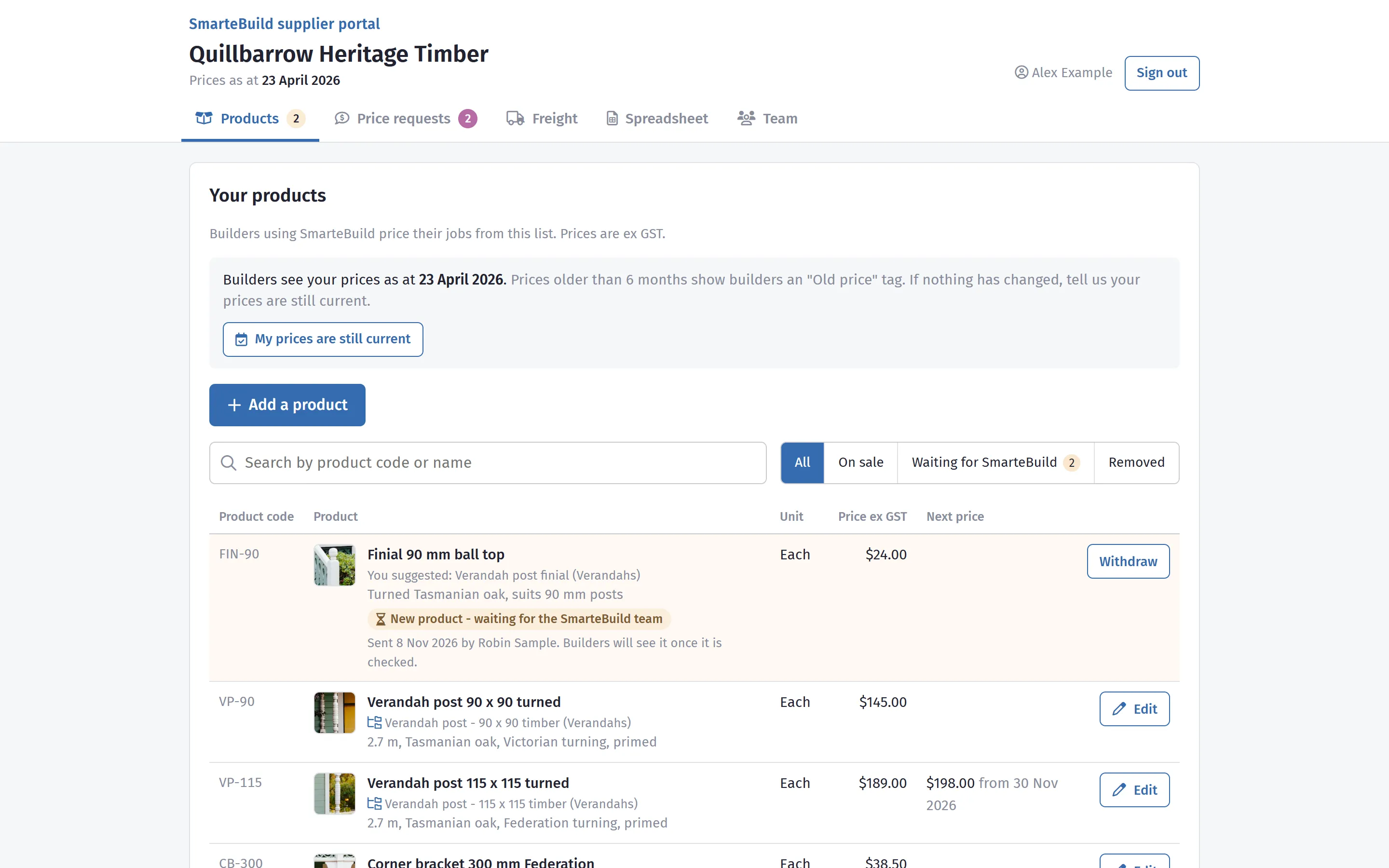
Section titled “Your products”The Products tab lists everything you sell through SmarteBuild: product code, name, unit, price excluding GST, any price that starts on a later date, and where builders find it in SmarteBuild.
- Search by product code or name.
- All / On sale / Waiting for SmarteBuild / Removed narrow the list. Waiting for SmarteBuild shows new products and changes the SmarteBuild team has not checked yet.
- Prices as at is the date builders see beside your prices. If nothing has changed for a while, press My prices are still current - builders see an Old price tag on prices older than six months, which makes them less likely to choose you.
Adding a product
Section titled “Adding a product”- Press Add a product.
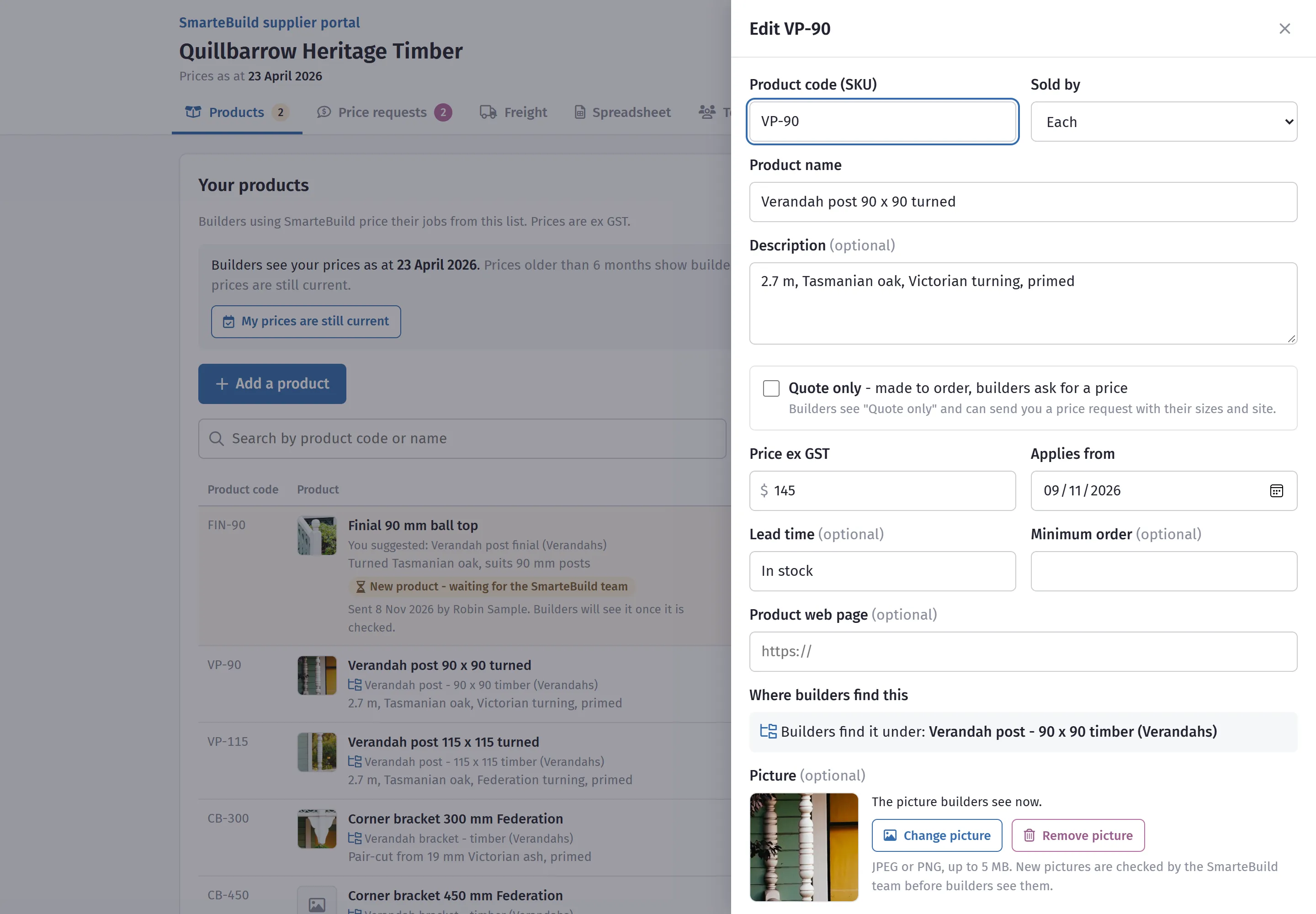
- Fill in:
- Product code - your own code (SKU). Keep it the same from one price list to the next: it is how we match your products when you send a spreadsheet.
- Product name and description - what a builder needs to know: size, timber or material, finish.
- Unit - how it is sold: Each, LM (lineal metre), M2, Sheet, Box and so on. A builder’s estimate multiplies your price by the quantity they measure in this unit.
- Price ex GST, or tick Quote only for products made to order (see below).
- Applies from - today, or a later date for a price rise you have already announced.
- Lead time, minimum order and product web page - optional, and worth filling in.
- Picture - optional; see Pictures below.
- Where builders find this - optional: start typing and choose the item in SmarteBuild’s price list that your product belongs under, for example Oven - 600 mm electric under Appliances. Not sure? Leave it - the SmarteBuild team will choose.
- Read What happens when you save - it says exactly what goes live now and what waits for the SmarteBuild team.
- Press Save.
A new product shows as Waiting for SmarteBuild until the team has checked it - it moves to On sale when it is approved. If something needs changing, we email you the reason and you can fix it and send it again.
Quote-only products
Section titled “Quote-only products”Some products have no list price - a stair kit made to the builder’s sizes, a gate, a fire surround. Tick Quote only and leave the price empty. Builders see Quote only instead of a price, and an Ask for a price button that sends you a request (see Price requests below).
Changing a product
Section titled “Changing a product”Press Edit on the product, change what you need, and press Save. What happens depends on what changed:
| What you change | What happens |
|---|---|
| The price, by 25% or less | Goes live on the Applies from date - today, or later. |
| The price, by more than 25% | Waits for the SmarteBuild team to check (a typo of $1,500 instead of $150 would otherwise reach every builder). |
| Lead time, minimum order | Saved straight away. |
| Product code, name, description, unit, picture, web page, quote only, where builders find it | Waits for the SmarteBuild team. Until then builders keep seeing what is there now. |
To change your mind about something still waiting, press Withdraw the change on that product.
Taking a product off sale
Section titled “Taking a product off sale”Press Remove from sale when you stop selling a product. Builders no longer find it; estimates that already use it keep it. Put back on sale reverses it.
Pictures
Section titled “Pictures”A good picture helps a builder choose your product - and it shows in front of their client in SmarteBuild’s colour selections.
- In the product’s panel press Add a picture (or Change picture) and choose a JPEG or PNG file up to 5 MB. A clear photo of the product on a plain background works best.
- Remove picture takes the current one away.
- New and changed pictures are checked by the SmarteBuild team before builders see them.
Sending a spreadsheet
Section titled “Sending a spreadsheet”For loading your whole range, or a price rise across hundreds of products, use the Spreadsheet tab.
- Press Download the template - or use your own price list, as long as it has a header row.
- Fill in one row per product:
| Column | What goes in it |
|---|---|
| SKU | Your product code. Required. |
| Product | The product’s name. |
| Description | Size, material, finish. |
| Category | Your own word for the range: Ovens, Fretwork, Verandah posts. We use it to file new products where builders look for them, and remember it for next time. |
| Unit | Each (or ea), LM (or per lineal metre), M2 (or sqm), Sheet, Box… |
| Price (ex GST) | Leave empty for a quote-only product. |
| Quote only | Yes for made-to-order products; otherwise leave it empty. POA in the price column means the same. |
- Back on the Spreadsheet tab, drop the file on the page (Excel .xlsx/.xls or .csv, up to 20 MB), choose the date the prices apply from, add a note if you like, and press Send price list.
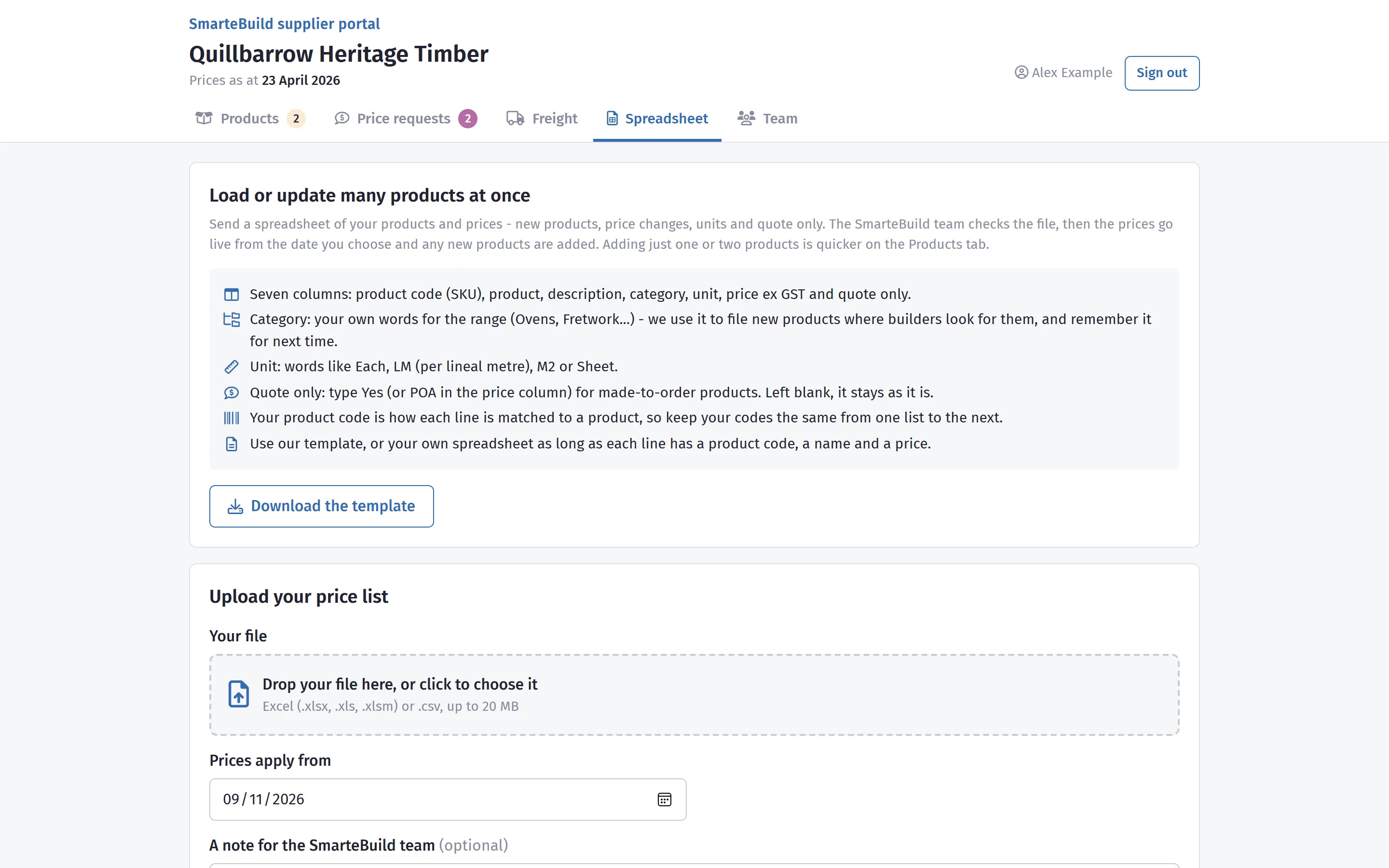
The SmarteBuild team checks the file - changed prices, new products, anything that could not be read - and puts it live. Files you have sent shows each file as Being checked, Live or Set aside. Products that are in the shared list but not in your file are left as they are - to take products off sale, use Remove from sale on the Products tab, or tell us in the note.
Freight
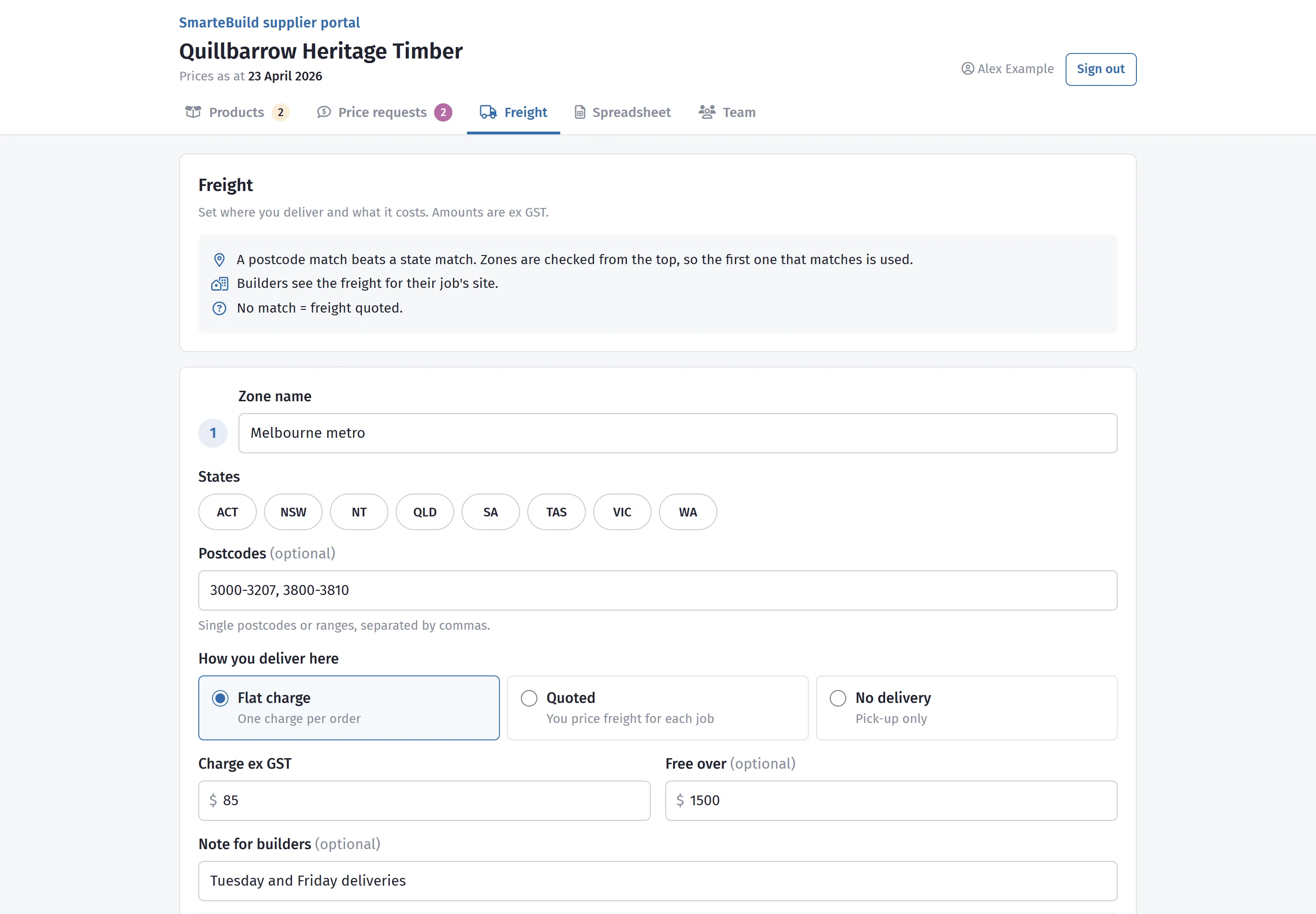
Section titled “Freight”On the Freight tab you set where you deliver and what it costs. Builders see the freight for their job’s site when they look at your products in an estimate, worked out from your zones.
- Press Add a zone and give it a name, for example Melbourne metro.
- Choose where it covers: tick states (ACT, NSW, NT, QLD, SA, TAS, VIC, WA) and/or type postcodes -
single postcodes or ranges, separated by commas:
3000-3207, 3800. - Choose how freight works there:
- Flat charge - one charge per order, ex GST. Optionally free over an order value.
- Quoted - you price freight for each job; builders see Freight quoted.
- No delivery (pick-up only) - builders see your pick-up address.
- Add a note if it helps (“Tailgate delivery, no crane”).
- Repeat for each zone, then press Save freight. It applies straight away.
How a site is matched: a postcode match beats a state match, and zones are checked from the top - the first one that matches is used. Put your narrowest zones (a metro postcode range) above your widest (a whole state). A site that matches no zone shows Freight: ask the supplier.
Example for a Victorian supplier:
| Zone | Covers | How | Charge |
|---|---|---|---|
| Melbourne metro | Postcodes 3000-3207, 3335-3341, 3750-3810 | Flat charge | $85, free over $1,500 |
| Regional Victoria | State: VIC | Flat charge | $180 |
| Interstate | NSW, ACT, SA | Quoted | - |
Also fill in your freight note (shown with every freight line) and pick-up address.
Price requests
Section titled “Price requests”When a builder presses Ask for a price on one of your products, you get an email - and the request appears on the Price requests tab, with a count on the tab.
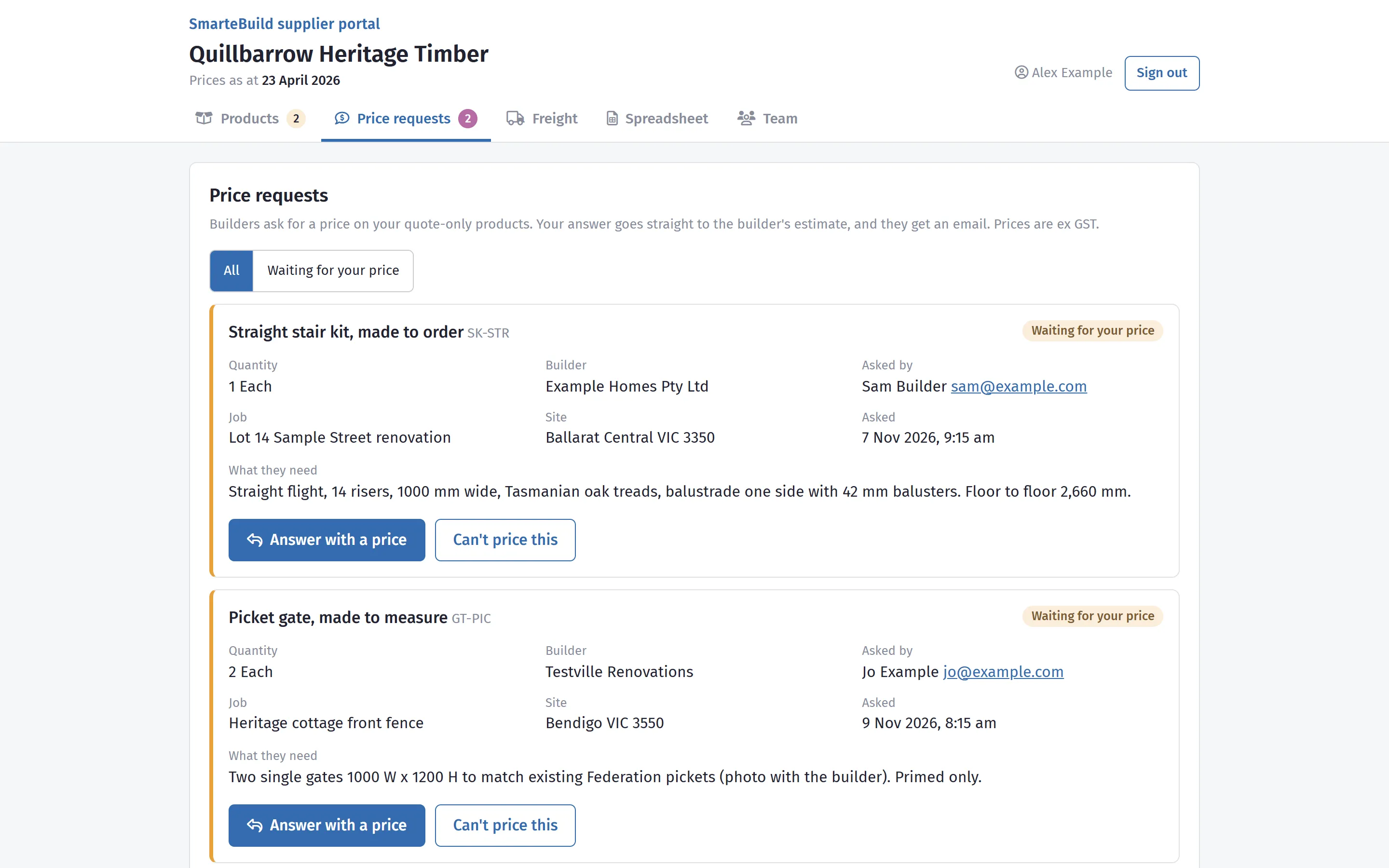
Each request shows the builder’s business, who asked, the job, the product, the quantity, what they need (“13 risers, 1 m wide, hoop pine”) and the delivery suburb and postcode.
- Press Answer with a price on the request.
- Type your price per unit, ex GST - per the product’s unit, the same way as your list prices.
- Optionally the freight to that site, ex GST, and a note (“Unfinished hoop pine; 3 weeks from order”).
- Check good until (30 days unless you change it).
- Press Send my price.
The builder gets a notification and an email straight away, and can put your price on their estimate with one click. If you cannot supply it, press Can’t price this and say why - the builder is told, so they are not left waiting.
Your team
Section titled “Your team”The Team tab lists the people who can sign in for your business.
- Owners can add and remove people: press Add a person, type their name and email address, tick Owner if they should be able to add people too, and press Add and email a sign-in link.
- Price requests are emailed to - a shared inbox such as sales@ works well. Leave it empty and every person on your team gets them.
- Removing someone signs them out everywhere straight away.
Questions
Section titled “Questions”Email hello@smartebuild.com.au or call (07) 3397 8805. We are happy to load your first spreadsheet with you.
Words used in this guide
Section titled “Words used in this guide”| Word | Meaning |
|---|---|
| ex GST | Prices in SmarteBuild are entered without GST; builders’ estimates add it. |
| LM | Lineal metre - a length, such as a handrail or a run of fretwork. |
| Quote only | A product with no list price; builders ask you for a price. |
| Price list item | Where builders find a product in SmarteBuild, such as Oven or Verandah post. |