
What the selections schedule is for
Available onBuilder
Colour Selection is the client’s selections schedule — every choice they make, room by room, recorded against the items you priced.
Why it needs to be a document
Section titled “Why it needs to be a document”Selections are the largest source of disputes on a residential job, and almost all of them come down to the same thing: nobody wrote it down.
The client remembers choosing the matt tile. The order went out for gloss. Six weeks later the bathroom is tiled and somebody is paying to redo it.
A selections schedule is the record that prevents that. It is also the document that gets signed off, which is what makes it useful when memories differ.
What it connects to
Section titled “What it connects to”| Connects to | How |
|---|---|
| BOQ items | Selections are made against the items you priced |
| Products | The specific product chosen, with SKU and image |
| Purchase Orders | The chosen product’s part number goes on the order |
| Variations | A selection above its allowance becomes a variation |
That last row is the commercially important one. Most PC and PS items in a bill are there because the client has not chosen yet. When they do, the difference between their choice and the allowance is a variation — and the selections schedule is where you find out.
The process
Section titled “The process”- Estimate. The estimator prices the job and sends the items that need choosing to the selections schedule — a category at a time, straight from the estimate.
- Select. The interior consultant and the client choose, in the office or through a private link sent to the client and their designer.
- Approve. The builder approves each selection, and raises a variation for anything over its allowance.
- Update the estimate. The approved selections are pushed into the BOQ items, with the change to the estimate shown and confirmed first.
- Update the orders. The same push updates every purchase order not yet sent, so what was chosen is what gets bought.
How it is organised
Section titled “How it is organised”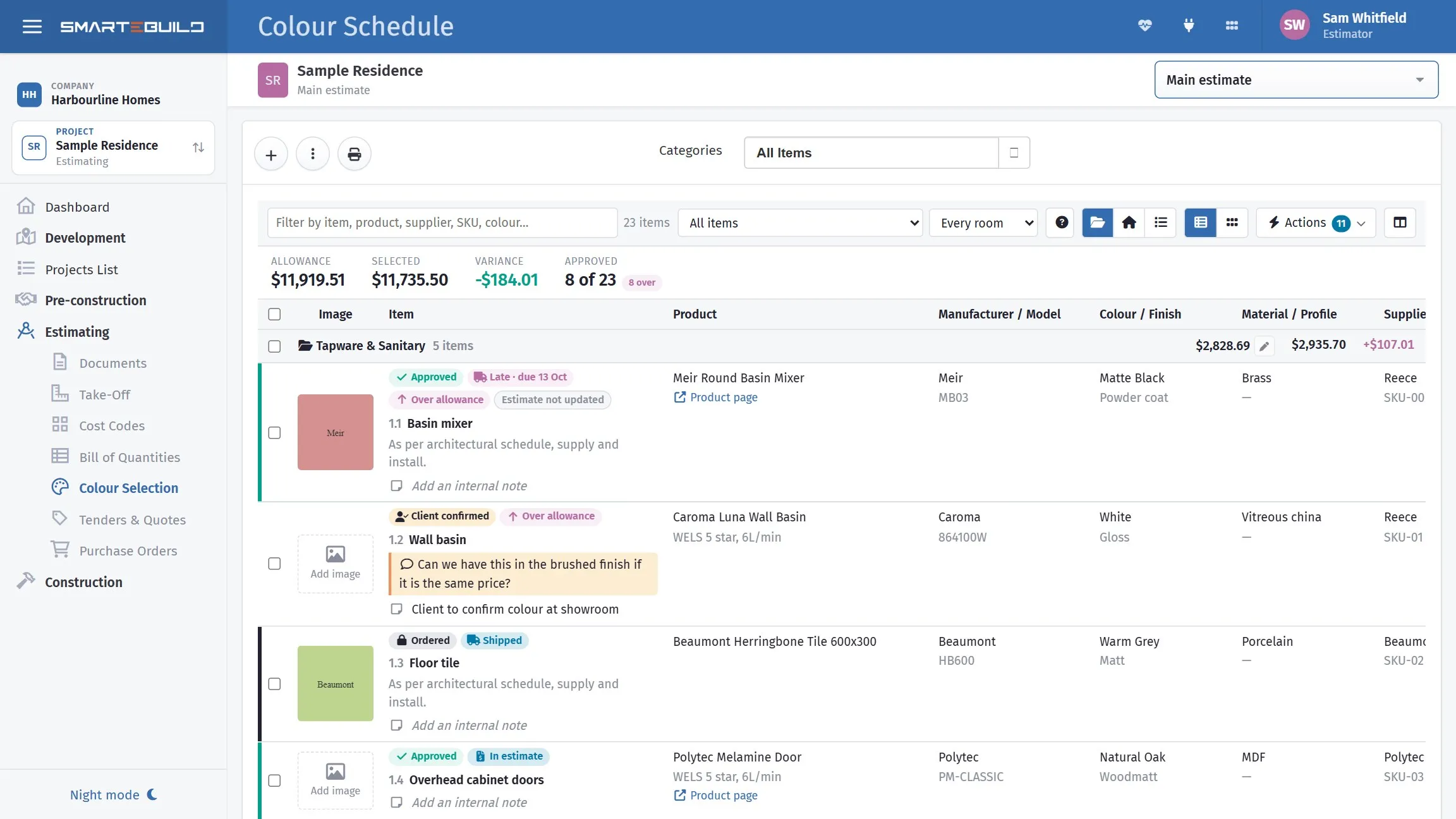
Allowance against selected across the top, then a line per item under its group. Most of the story is in the pills: Client confirmed, Over allowance, Late, Ordered, Estimate not updated. The client’s own question sits on the item it is about, in their words.
Rooms, containing categories, containing items.
Kitchen Tapware Sink mixer Benchtops Stone benchtop Appliances Oven CooktopMain bathroom Tapware Basin mixer Shower mixer Tiling Floor tile Wall tileThat structure matters because it is how a client thinks. They choose for the kitchen, not for cost code 1100.
What an item carries
Section titled “What an item carries”| Field | What it is |
|---|---|
| Item Code / Item Name | What is being chosen |
| Description | The detail |
| Price and Quantity | What it costs (the price shows only to users with the See prices and allowances permission) |
| Product URL | Link to the product |
| Colour Selection Note | Visible to the client |
| Internal Note | Never shown to the client |
The two note fields are worth keeping straight. “Client leaning towards matt, chase by Friday” belongs in the internal note.