
Cost codes and structure
Available onEstimatorBuilder
Every price list has a structure of cost codes, shown in the left pane of the Price lists page. Items are filed under them, and picking one shows its items and everything beneath it. On a long list, type part of a code or name in the box above the tree to jump to a cost code — the matches show with their parents for context, and Enter selects the first one.
The structure itself is edited on the Structure screen — Structure in the toolbar opens it for the list you are looking at. That is where you add, rename, nest and remove cost codes.
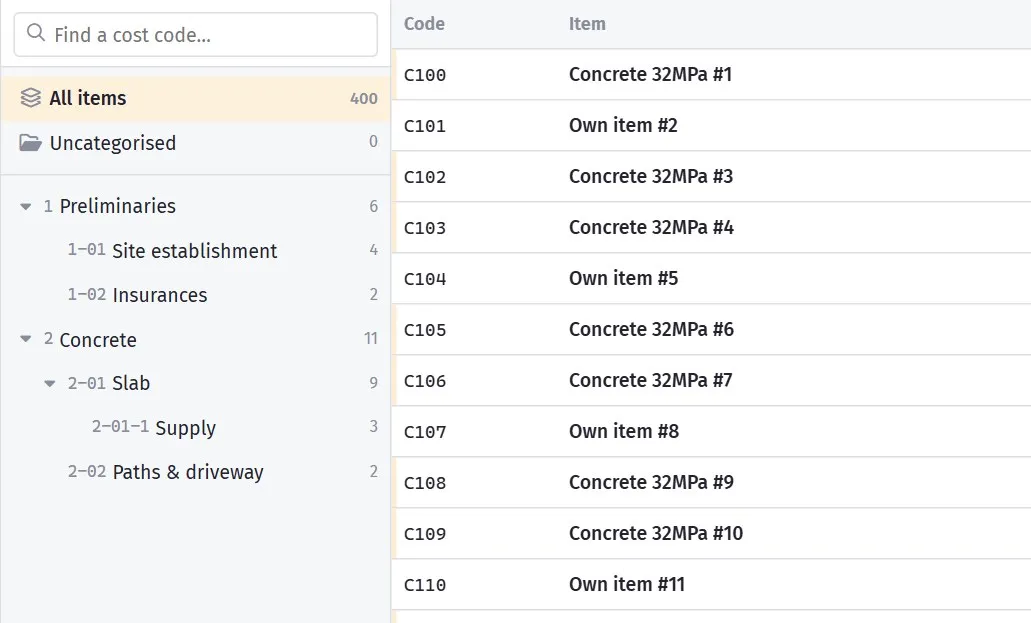
Categories decide where an item lands when you import it.
Filing items
Section titled “Filing items”An item lives in one cost code per list. To move it:
- Drag the row (or several selected rows) onto a cost code in the left pane.
- Select rows and use Move to in the bar at the bottom.
- In the drawer’s Details tab, under Filed under, use the pencil beside the list to change the cost code.
The same drawer section can file an item in another of your lists — Add to a price list — or take it out of one. An item taken out of its last list shows under Uncategorised at the top of the left pane, which is also where anything that has never been filed turns up. Nothing there appears in a BOQ import, so it is worth clearing.
Follow your cost codes
Section titled “Follow your cost codes”The structure should mirror your cost code structure.
Same names, same order, ideally the same codes:
100 Preliminaries200 Site works300 Concrete310 Slab320 Driveway and paths400 Framing500 Roofing...Two reasons this matters.
Importing is faster. Pricing the concrete cost code means opening the concrete category — no translation between two different organising schemes.
Nothing gets lost in translation. When the two structures diverge, people import items into whatever category looks closest, and the bill ends up coded inconsistently.
Two levels covers most residential work. Three is occasionally justified on
commercial. Where you want a fourth, an extra digit in the code usually reads better
anyway: 310 Slab, 311 Slab — excavation.
You will rarely want the depth in any case. Finding an entry by expanding three levels is slower than filtering a flat list, and search and the filter chips do most of the finding — the tree is for browsing, not for searching.
Number cost codes the same way as your cost codes, in gaps of 100.
Leaving room means adding 330 Retaining walls in three years without renumbering
anything, and the order still comes out right.
Deleting a cost code
Section titled “Deleting a cost code”Move the items out first — the counts beside each cost code show what is in it. Items left in a deleted cost code end up under Uncategorised, which takes longer to sort out than moving them beforehand.
When your cost codes change
Section titled “When your cost codes change”If you restructure your cost codes, restructure the price list to match, at the same time.
The two drifting apart is the usual failure. It happens gradually, nobody notices, and six months later importing is slower than it used to be and nobody can say why.
A structure to start from
Section titled “A structure to start from”For residential building:
| Code | Cost code |
|---|---|
| 100 | Preliminaries |
| 200 | Site works |
| 300 | Concrete |
| 400 | Framing |
| 500 | Roofing |
| 600 | External cladding |
| 700 | Windows and doors |
| 800 | Services |
| 900 | Internal linings |
| 1000 | Fixing and joinery |
| 1100 | Wet areas |
| 1200 | Painting |
| 1300 | Floor coverings |
| 1400 | External works |
| 1500 | Final clean and handover |
Add children where you genuinely price things separately — 310 Slab and
320 Driveway under Concrete, 810 Plumbing and 820 Electrical under Services.
Use the same list for your cost codes and you have set up both at once.
Product categories are a different thing
Section titled “Product categories are a different thing”Supplier products have their own small categories — a way of grouping the products linked to one item from one supplier, such as Cement and Aggregate under a concrete item. They are managed on the product form, not here. See Products.