
Uploading and organising
Available onEstimatorBuilder
Getting files in is quick. The work worth doing is in how you title and file them.
Uploading
Section titled “Uploading”Three ways, all into a folder:
- Drag files from your computer onto the file list. They go into the open folder.
- Drag them onto a folder on the left. They go into that folder, whichever one is open.
- Upload at the top, then choose the files.
You can drop several files at once. When they are in, a message says how many were uploaded; if any were refused - a type of file SmarteBuild does not accept, or one too big - it lists each one and why, so nothing goes missing quietly.
Upload a single file into the open folder and it opens straight away, ready to title.
Titling
Section titled “Titling”The Title is what everyone sees - in the Take-Off drawing picker, in the tender attachment list, on the order. Change it on the Details tab of the open file.
Use the drawing’s own title and number:
| Weak | Better |
|---|---|
plans.pdf |
A-101 Floor Plan |
engineering |
S-201 Slab Layout and Details |
client stuff |
Selections Schedule - Hendricks |
scan001.pdf |
Soil Report - 18 Beach Road |
Use the architect’s numbering, not your own. When they email about A-101 you want to find it without translating.
Suggest (beside the title) proposes titles from the job, the folder and the file name - click one to use it, then Save.
Folders
Section titled “Folders”Every job starts with a few standard folders (shown with an orange icon). You can add your own inside them or beside them.
| To | Do this |
|---|---|
| Add a folder | Hover over a folder and click + for a folder inside it, or the folder button at the top of the list for one at the top level. |
| Rename | Hover and click the pencil (or select the folder and press F2). |
| Move a folder | Drag it onto another folder. Drop it on the empty space below the list to move it to the top level. |
| Delete | Hover and click the bin. Only an empty folder can be deleted - move its files and sub-folders out first (old versions count). |
The standard folders cannot be renamed, moved or deleted, because every job has them. The folders you open and close are remembered next time.
A structure that works for most jobs:
ArchitecturalStructuralCivil and drainageServicesReports and assessmentsCertificates and approvalsClient selectionsContractsMoving files
Section titled “Moving files”Drag a file from the list onto a folder on the left. It moves, keeps its versions and stays attached to everything it was attached to.
Finding things
Section titled “Finding things”Type in Search every folder in this job and the list shows every match, wherever it is filed, with its folder in its own column. Click the folder name to go there.
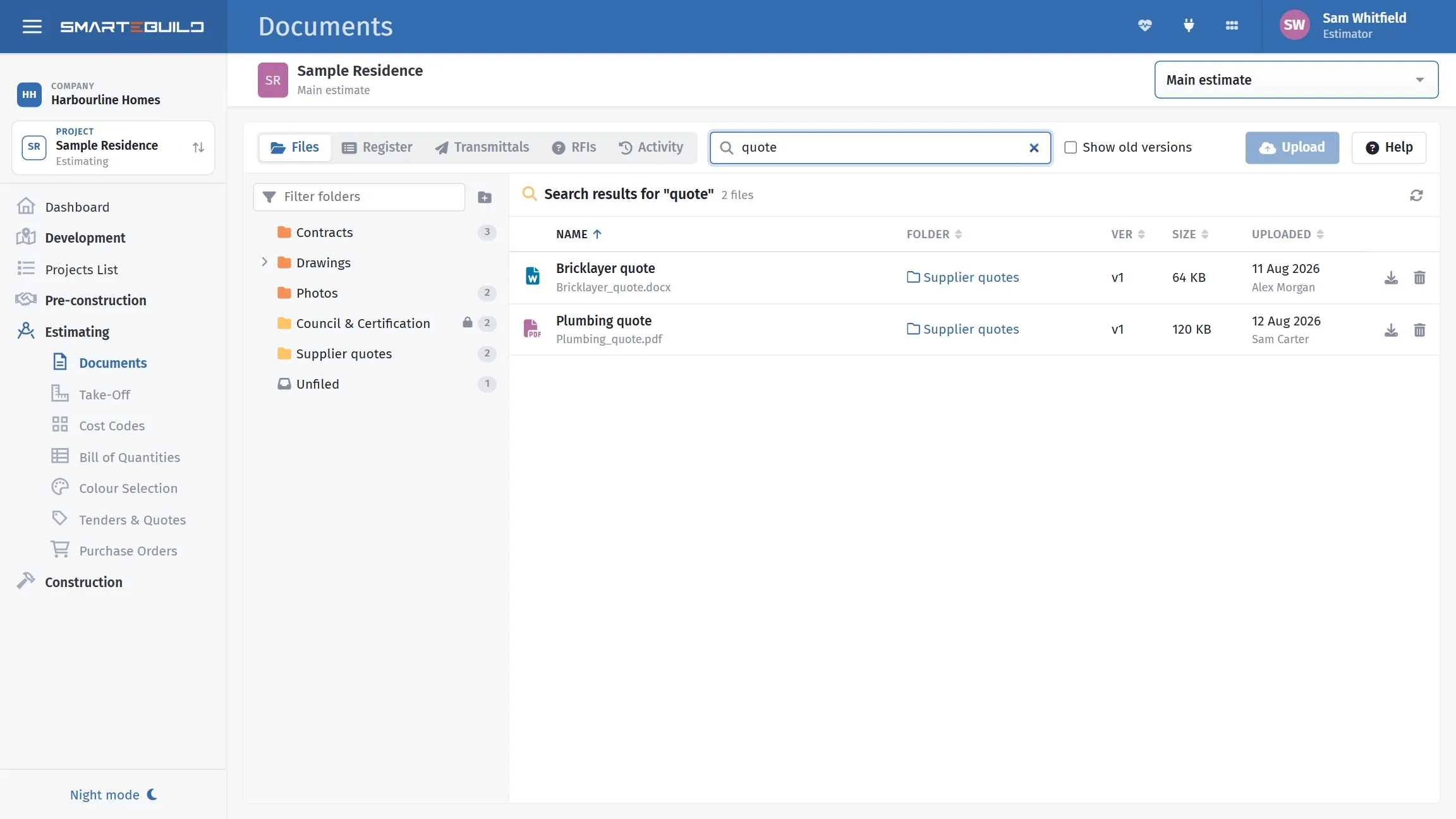
Search looks through every folder; the Folder column says where each file lives.
Click Name, Ver, Size or Uploaded to sort. Sorting by Uploaded puts the newest first - the quickest way to find what arrived this morning.
The zip button above the list downloads the whole folder in one go (tick Show old versions first if you want those too).
Note (Details tab) records anything worth knowing about a document - why a report was commissioned, what it supersedes. A small note mark in the list shows which files have one.
What changed in a particular revision goes in What changed in this version instead, so it stays with that version. See Versions and revisions.
Obsolete documents
Section titled “Obsolete documents”Tick Obsolete on the Details tab to mark a document as no longer current without removing it - a drawing withdrawn entirely rather than superseded, or a report that no longer applies.
It disappears from the list (tick Show old versions to see it), stops auto-attaching to new orders and tenders, and disappears from the client’s portal. The record stays.
Deleting
Section titled “Deleting”The bin on a file’s row, or on the open file, deletes it for good.
A file cannot be deleted while it is attached to something - an order, a tender or quote, an expense, a variation, a claim or a BOQ item. SmarteBuild says where, and the Where it’s used tab lists them. Items, orders, expenses and quotes can be removed there with Remove (or Remove from all); the others are removed from the record itself.
Deleting the newest version of a document makes the previous version the current one again.
Before you take off
Section titled “Before you take off”Two things worth checking before opening a drawing in Take-Off:
- It is the current version. Measuring a superseded drawing is a whole afternoon lost.
- It is a real PDF, not a renamed image or an office document. Take-Off will not open those.