
Recording a quote
Available onEstimatorBuilder
Not every price comes through a tender. Someone emails a quote, rings with a number, or hands you a page on site. New quote on the Tenders & Quotes list is where those go.
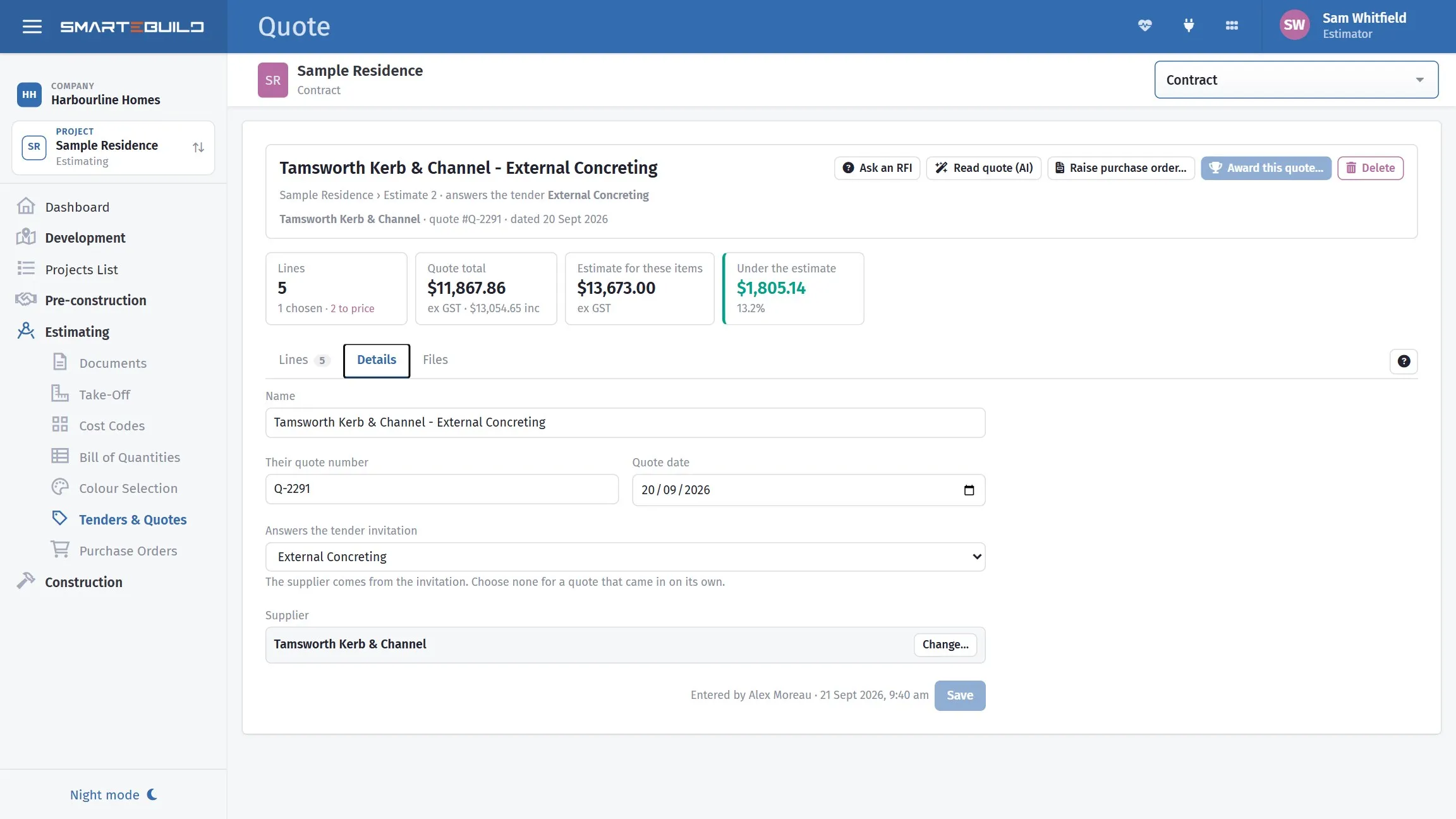
Record the quote against the job so the number has a source.
The quote window
Section titled “The quote window”A quote opens on its Lines. Across the top sit the numbers the old page left you to work out: how many lines there are and how many are chosen, the quote total ex and inc GST, what the estimate has for the same items, and how far over or under the estimate the quote is.
Details holds the name, the supplier’s quote number and date, and who it is from. Files holds their documents.
The details
Section titled “The details”| Field | What it is |
|---|---|
| Name | What the quote covers |
| Their quote number | Their reference |
| Quote date | The date on their document |
| Answers the tender invitation | Links it to a tender you ran. Type part of the tender or subcontractor name to find it. The supplier then comes from the invitation |
| Supplier | For a quote on its own — search the supplier list by name |
A quote with no supplier can still be recorded, but nothing can be made in their name: set the supplier before adding products from the quote.
A quote from a tender starts with the tender’s items
Section titled “A quote from a tender starts with the tender’s items”When a new quote is linked to a tender invitation, Start with the tender’s items (ticked by default) puts every item on the tender onto the quote at the tender’s quantity, with no price yet. The quote opens with a box on each of those lines: type the price in (change the quantity too if theirs differs), and press Save prices — or Enter in a price box. Two ticks sit above the lines:
- The prices I type include GST — each is divided by the job’s GST rate on the way in.
- Create a product for the supplier on each priced line — ticked by default; their rate becomes a product on the item, which is what carries it into the estimate on award.
A line left blank stays unpriced and keeps its box; the quote cannot be awarded until every line is priced or removed. Once a price is saved the line is an ordinary one, changed through Edit or by clicking the figure.
The lines
Section titled “The lines”Each line is one of the estimate’s items with what the supplier quoted for it. The estimate’s own quantity and price sit beside the quoted ones, and a quantity that does not match — or a price more than 10% over the estimate’s — is marked. Only the ones to check narrows the list to those.
- Add a line — choose the cost code (type to search), then the item under it, then the product. The quantity starts at the estimate’s.
- Add a whole cost code — every item under it at the estimate’s quantity, priced at zero, ready for you to type their prices in. Items already on the quote are skipped.
- Change a quantity or price in the row — click it, type, press Enter. A sum
like
=2400/26works, so a lump sum per item can be typed as it is written on their quote. - Price includes GST — tick it in the line window when you type a GST-inclusive figure. Prices are stored ex GST, at the job’s own GST rate.
- A discount or credit is a line with a negative price (or a negative quantity). It comes off the quote total like any other line, and subcontractors can enter one the same way on their own pricing page.
- Comment — kept on the quote line, for example what they excluded.
More has the bulk actions: choose or unchoose every line, match the quantities to the estimate (their prices are kept), match everything to the estimate (their prices are overwritten — it asks first), remove the zero-value lines, and remove every line.
Choosing lines
Section titled “Choosing lines”The star on a line makes this quote the chosen price for that item. An item has one chosen price across all its quotes, so choosing a line clears any other quote’s choice for the same item — a line says another quote is chosen when that is the case.
Awarding the whole quote
Section titled “Awarding the whole quote”Award this quote chooses every line at once. Tick Update the estimate items too to write the quoted quantities, this supplier’s products and their prices into the estimate — the same Award as on the tender list.
Once awarded, a green line under the quote’s name says when and by whom. Undo award on it puts back the choices and the estimate figures from before - for the latest award on the estimate, and never over an item someone has edited since.
Is it the cheapest?
Section titled “Is it the cheapest?”Where another quote prices the same item, the price column says so: Lowest when this quote is the cheapest, or the other supplier’s name and price when it is not. Older versions of a subcontractor’s quote are not counted - only their current one.
Raising a purchase order from the quote
Section titled “Raising a purchase order from the quote”Raise purchase order makes an order to the quote’s supplier with the quote’s items, products, quantities and quoted prices, linked back to the quote. Choose only the chosen lines (after an award, that is the lot) or every line. The order is made unapproved and unsent and opens in a new tab, where it is checked, approved and sent as usual. Orders raised from the quote are listed under its name.
It needs the Create orders permission and a supplier on the quote.
Attach the document
Section titled “Attach the document”Always. The attached PDF is what settles a scope disagreement, and it carries the subcontractor’s own conditions and exclusions — which the typed price does not.
A quote recorded as a number with no document is a number nobody can check.
Let the document be read for you
Section titled “Let the document be read for you”Read quote (AI) at the top of the quote takes the supplier’s PDF or photo and reads its lines for you to check before anything is recorded. It works for any quote, including one that arrived by email with no tender behind it:
- A quote that answers a tender is matched to the tender’s items.
- A quote on its own is matched to the estimate’s items. A line nothing matches can be pointed at another item, or made a new item under a cost code.
The document is attached to the quote as soon as it is uploaded. Add puts the lines after the quote’s own, or tick Replace the lines already on this quote to swap them. Their quote number and date are filled in from the document.
On the tender list, Read quote on a subcontractor’s row does the same and creates the quote - see Reading a quote with AI. Each read is paid from your company’s AI credit.
Linking it to a tender
Section titled “Linking it to a tender”Where the quote does relate to a tender you ran — a revised price, a late bid, a subcontractor who preferred to reply by email — link it.
That keeps everything about the package in one place, and preserves the trail back from a rate in the bill to the source of the price.
Making a product from the quote
Section titled “Making a product from the quote”In the line window, the product list offers Make a new product for the supplier. That captures the specific product quoted, with its supplier and part number, so it can be used on the item.
Worth doing where the quote is for a specific product rather than labour. It means the eventual purchase order carries the part number, which is what prevents substitutions. See Suppliers and products.
Changing the price later. Change it in the row or in the line window: the product made from the quote takes the new price as well, and the page says so. This only happens when the product belongs to the quote’s supplier — a line pointing at another supplier’s product changes the line only, because this quote is not that supplier’s price.
When to use this rather than a tender
Section titled “When to use this rather than a tender”A lump sum still needs recording, or the estimate has nothing behind it.
| Situation | Use |
|---|---|
| Comparing several subcontractors on real work | Tender |
| A single supplier’s price for a product | Quote received |
| A late or revised price against a tender you ran | Quote received, linked to the bid |
| A price you were given informally | Quote received |
| Anything significant you want comparable | Tender |
If you find yourself recording three separate quotes for the same work, that work should have been a tender — you have done the same job with none of the structure.
What happens next
Section titled “What happens next”The quote can be brought into the bill against items — see Bringing a quote into the BOQ.