
Estimates and templates
Available onEstimatorBuilder
An estimate is one priced version of a job. It owns the Bill of Quantities, the take-off, the cost codes and the markups. A project can carry as many as you need, and they do not interfere with each other.
Creating an estimate
Section titled “Creating an estimate”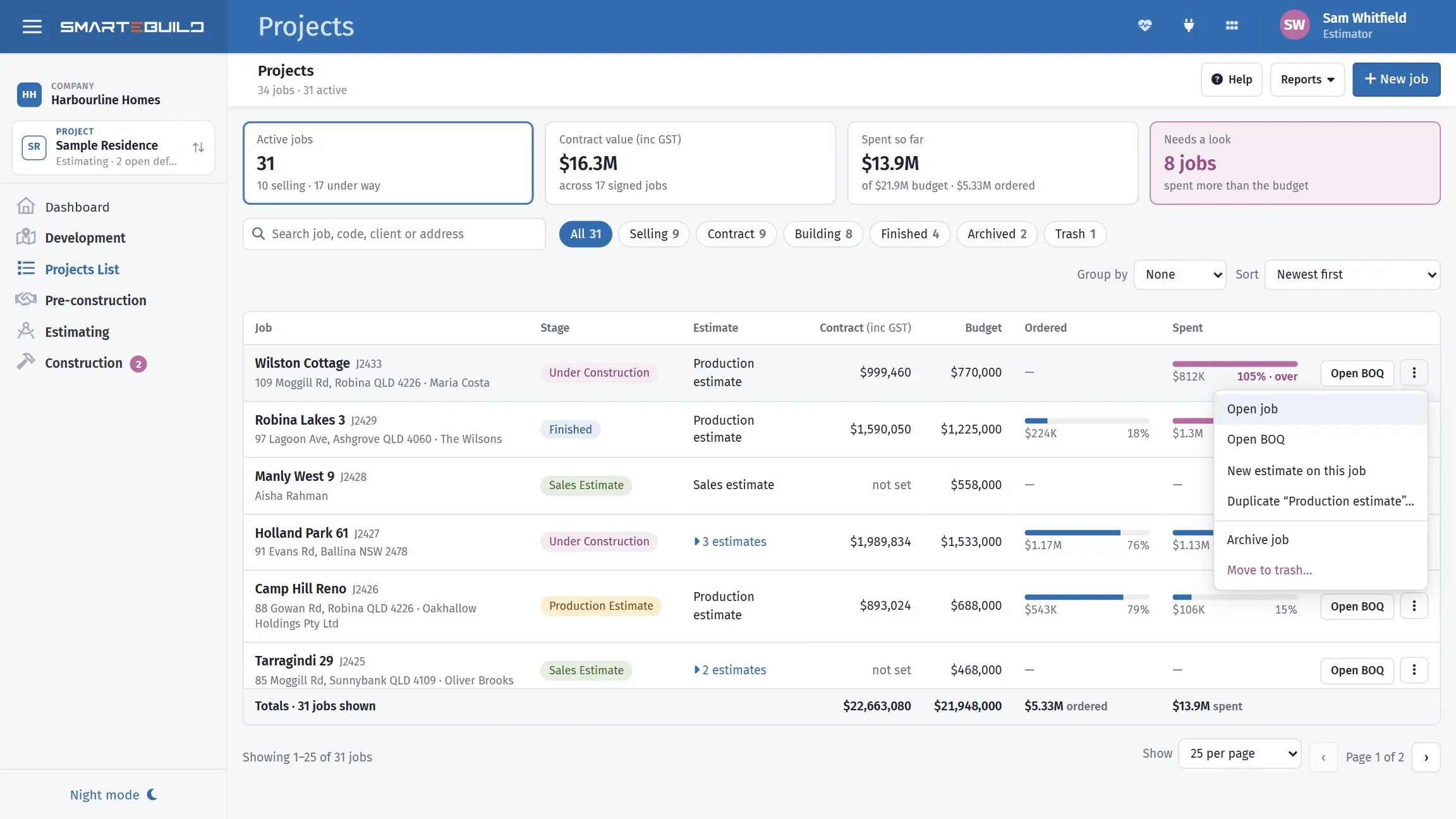
You can also start one without opening the job: New estimate on this job, or Duplicate to copy the estimate the job is currently showing.
With the project open, choose New above the list of estimates (or + → New estimate on this project at the top of the page).
| Field | What it does |
|---|---|
| Estimate name | How you tell this version from the others |
| Code, House size, Contract price | Optional now; the contract price is inc GST |
| Job status, Supervisor | Where the job is up to, and who runs it |
| Start from | A blank estimate, A template (type to filter the list), or A price list (builds the BOQ from every item in it) |
| Make this estimate a template | Makes this estimate available to copy from later |
Starting from a big template can take a few seconds; the button says Creating… until it is done. The new estimate opens straight away. Cost code lists set to switch on for every new estimate are switched on for it automatically.
The field hint on the name suggests Production Estimate or Sales Estimate, and
that is the idea — name the estimate after what it is for, not what number it
is.
Choosing a price list
Section titled “Choosing a price list”The price list you pick decides which rates are offered when you build items. You can still type a rate by hand or take one from a different supplier, but the default drives most of the work.
Pick the price list that matches the kind of job. If you keep separate lists for renovation rates and new-build rates, choosing the wrong one at this point means correcting rates item by item later.
Why you would have several estimates
Section titled “Why you would have several estimates”| Situation | How to handle it |
|---|---|
| Client wants a cheaper option | Duplicate, downgrade the finishes, compare |
| Tender revision issued | Duplicate, update to the new drawings, keep the original |
| Two build methods | One framed, one steel, priced side by side |
| Budget vs contract | Keep the early budget alongside the signed version |
Duplicating an estimate
Section titled “Duplicating an estimate”Choose Duplicate in the estimate’s ⋮ menu — on the job page, or on the job in the Projects list. A Duplicate estimate window opens listing what can come with the copy, and how much of each the original holds (34 tenders · 17 quotes, 104 files · 58 MB). Anything the original has none of is greyed out as Nothing to copy. The window remembers your last choice on that computer. The copy is called “Copy of” the original and opens straight away.
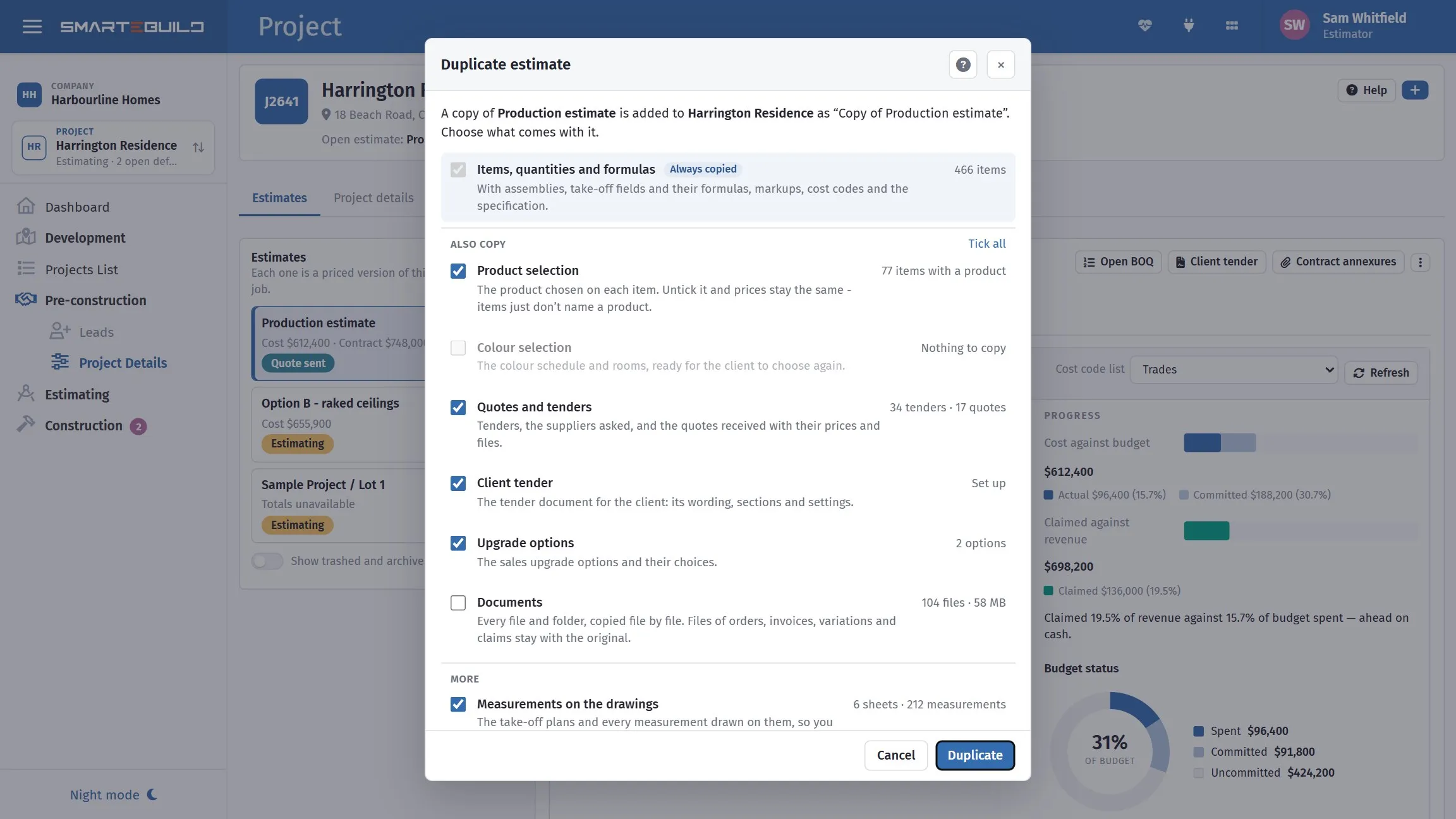
Each line says how much of it the original holds, so you can see what you are about to copy — 104 files and 58 MB of documents is why that one starts unticked. Colour selection is greyed out because this estimate has none.
Always copied, and not something you can untick: the items, their quantities and formulas, with the assemblies, take-off fields and their formula fields, the markups, the cost codes (including any switched off as Not required and their notes) and the specification.
Also copy:
| Tick | What comes | Ticked to begin with |
|---|---|---|
| Product selection | The product chosen on each item. Untick it and every price stays exactly the same, but no item names a product. | Yes |
| Colour selection | The schedule, its categories, allowances and rooms. Client confirmations and admin approvals do not come — see the note below. | Yes |
| Quotes and tenders | The tenders with the suppliers asked and the items tendered, and the quotes received with their prices, chosen lines and files. The award history stays with the original — the copy already has the awarded prices. | Yes |
| Client tender | The tender document’s wording, sections and settings — not the client’s name, date, pictures or plans | Yes |
| Upgrade options | The sales upgrade options and their choices | Yes |
| Documents | Every file and folder, copied one by one. It uses storage, which is why the size is shown and why this one starts unticked. Files belonging to orders, invoices, variations and claims stay with the original. | No |
More:
| Tick | What comes | Ticked to begin with |
|---|---|---|
| Measurements on the drawings | The plan sheets and every measurement drawn on them, with copies of the plan files, so the new estimate has its own drawings. Untick it and the take-off quantities still come, but the drawings do not. | Yes |
| Payment stages | The contract’s payment stages and percentages | Yes |
| Schedule | Tasks, links and stages, with the job’s working days and holidays | Yes |
| Team access | Everyone who can open the original can open the copy, with the same access | Yes |
Never copied: orders, invoices, variations, claims and site records. Those belong to what actually happened on the original job.
If one ticked part cannot be copied, the copy still goes ahead and the message names what was left out — Estimate duplicated, except: documents. Everything else came across.
Worked example: pricing a cheaper option
Section titled “Worked example: pricing a cheaper option”The Hendricks extension is priced at Tender — Rev A and the client asks what it
would cost with a colorbond roof instead of tiles.
- In the ⋮ menu of
Tender — Rev A, choose Duplicate, leave the ticks as they are, and press Duplicate. - Rename the copy
Tender — Rev B (colorbond roof). - In the new estimate’s BOQ, open the roofing cost code and swap the tile items for the colorbond items from your price list.
- Compare the two estimates side by side in either one’s Summary — the budget vs actual bars under the table put them on one scale.
Rev A is untouched. If the client goes back to tiles, you still have the original priced and ready to submit.
Templates
Section titled “Templates”Ticking Make this estimate a template makes an estimate available in the Copy items from a template dropdown when creating new estimates.
This is how most builders avoid rebuilding the same bill on every job. Set up one estimate with your standard cost codes and the items you use on nearly every build — preliminaries, site costs, the standard trades — mark it as a template, and start every new job from it.
A template is a normal estimate. It lives under a project like any other, so many
builders keep a project called something like _Templates to hold them.
Archived and deleted estimates
Section titled “Archived and deleted estimates”An estimate can be archived or deleted without touching its siblings.
Both are hidden from the list of estimates by default. The Show trashed and archived switch under the list of estimates brings them back into view, marked Archived or Trashed so you know what you are looking at. Restore from trash in the estimate’s menu brings a trashed one back; untick Estimate is archived under Edit details to unarchive one.
Two things worth knowing about that switch:
- It remembers. Your choice is kept against your login, so it survives leaving the page and coming back — you do not have to re-tick it every time.
- Showing them is not the same as being able to use them. A trashed or archived estimate appears in the grid but still cannot be selected, which is why the grid hides them by default: it then agrees with the estimate dropdown, which has always excluded them.