
The document register
Available onEstimatorBuilder
Documents is the drawing register for a job: the drawings, specifications, reports, certificates and photos the job runs on.
It is worth treating as a register rather than a folder, because other parts of SmarteBuild read from it.
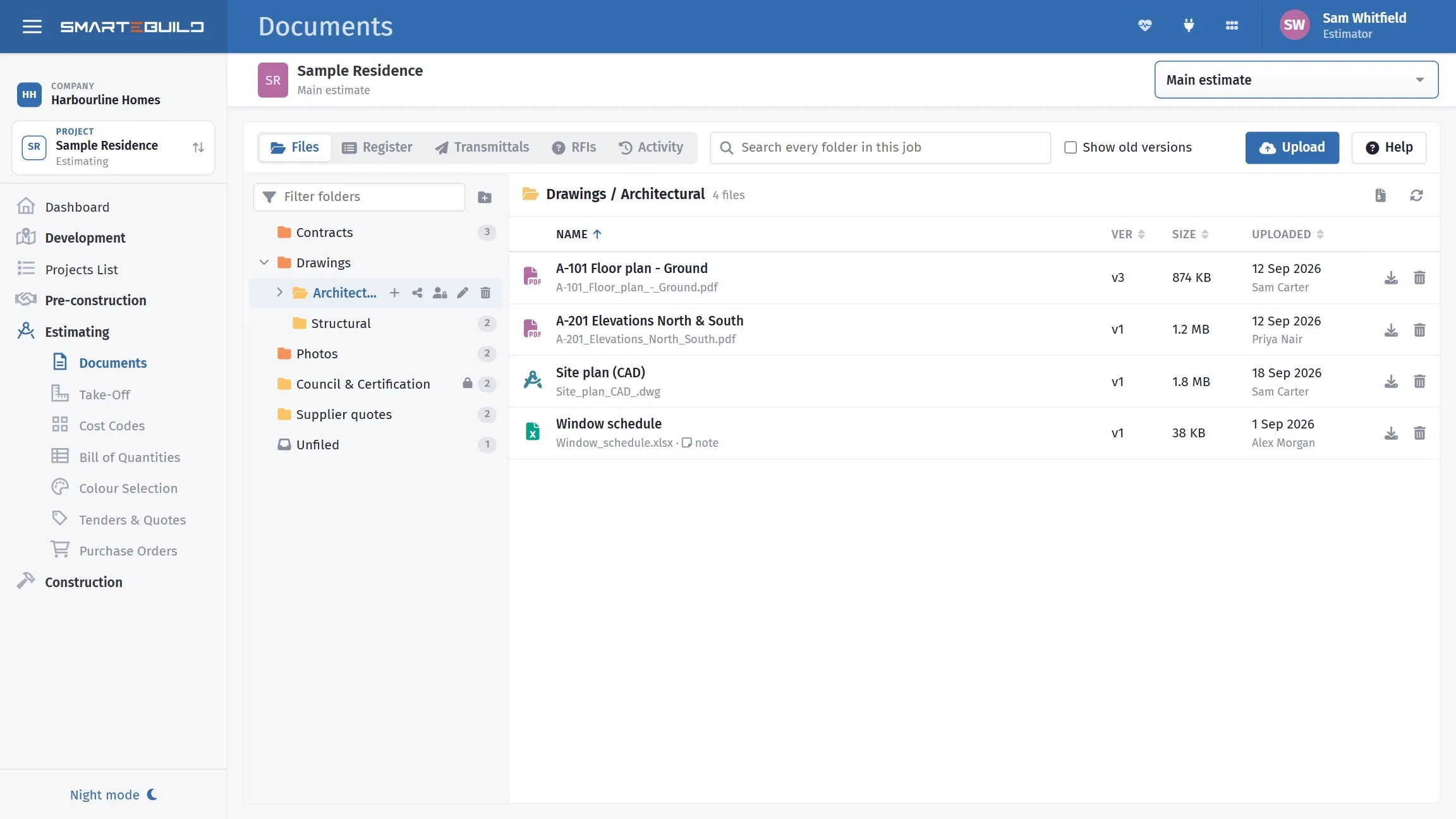
Folders on the left, the open folder’s files on the right.
How the page works
Section titled “How the page works”| Part | What it does |
|---|---|
| Folders (left) | The job’s folders. Click one to list its files. Filter folders finds a folder by name. |
| File list (middle) | The folder’s files. Click a column heading - Name, Ver, Size, Uploaded - to sort by it; click again to reverse. |
| Search (top) | Looks through every folder in the job at once - titles, file names and notes. The results show which folder each file is in. |
| Show old versions | Replaced copies are hidden until you tick this. |
| Upload | Adds files to the open folder. You can also drag files from your computer onto the list or onto any folder. |
| Files / Register / Transmittals / RFIs / Activity | The views at the top left. Register is the drawing register (numbers, revisions, statuses); Transmittals is the record of documents formally issued; RFIs are the questions put to the architect, engineer and consultants; Activity is the record of who did what. See The drawing register, Transmittals, RFIs and Restricted folders, upload links and activity. |
Click a file and the screen splits in two: the list on the left, the file on the right.
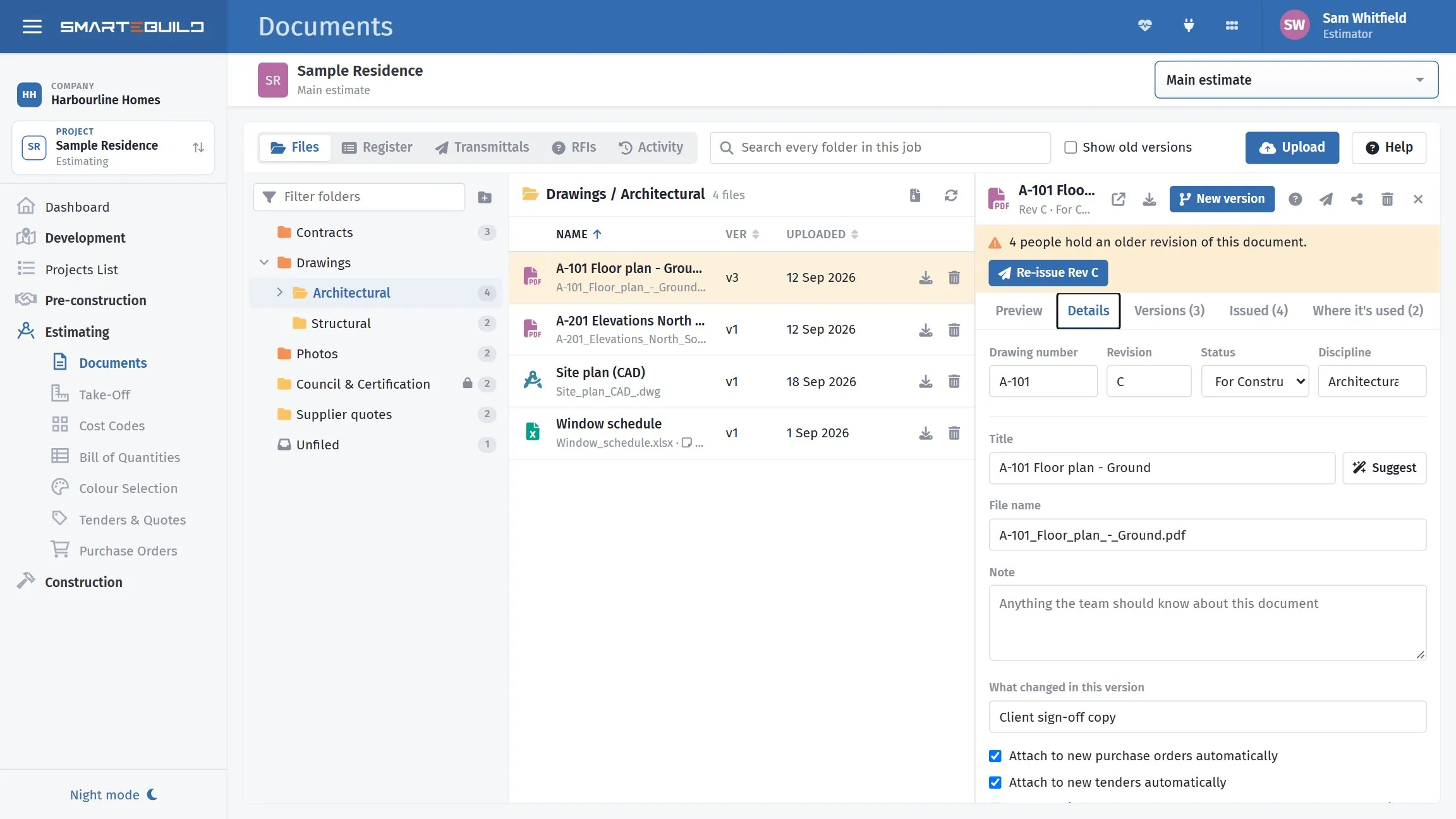
A file open beside the list - preview, details, versions and where it is used.
The file side has these tabs:
| Tab | What is on it |
|---|---|
| Preview | The PDF or photo itself. Word and Excel files show as pages too - every sheet of a workbook - MS Project programmes as their task list, and CAD drawings (DWG and DXF) with zoom and layers. Other file types show a Download button. |
| Details | Title, file name, note, what changed in this version, and the auto-attach and obsolete settings. |
| Versions | Every version of this document, newest first. Click one to open it. |
| Issued | Everyone who was sent any version of it, and whether what they hold is current. |
| Where it’s used | The orders, tenders, expenses and BOQ items this file is attached to. |
Across the top of the file are Open in a new tab, Download, New version, Issue, Share and Delete. A spreadsheet also has Edit.
MS Project programmes
Section titled “MS Project programmes”An MS Project file (.mpp, or the older .mpx) shows in the Preview as its task list: every task
in its outline, with the summary groups in bold and milestones marked ◆, then the duration, start,
finish and predecessors (written the way MS Project writes them, e.g. 12SS+2d) and a bar for each
task on one timeline. Blue bars are the planned work, teal shows what is already done. You don’t need
MS Project to read it.
To bring the programme into the job’s schedule, open it and click Import into schedule. SmarteBuild reads the file first and shows what is in it - tasks, milestones, links, the start and finish dates it works out, the working week and holidays, the people it matched to your contacts - and anything that can’t come across exactly, before anything changes. If the job already has a schedule, it says how many tasks it has and that importing replaces all of them; you can undo it on the schedule straight afterwards.
Tick or untick Use the programme’s working week and holidays to choose whose calendar the schedule uses. Then click Import (or Replace the schedule) and Open the schedule.
You need permission to edit the schedule’s tasks, and access to the Schedule.
CAD drawings
Section titled “CAD drawings”DWG and DXF drawings show in the Preview without a CAD program. Scroll to zoom in and out, drag to move around, and click Fit to see the whole drawing again.
- Layers lists the drawing’s layers with their colours. Untick a layer to hide it, type in the box to find one, or use All / None.
- Dark background suits drawings drawn in light colours for a black screen. Your choice is remembered on that computer.
- Download gives you the original file.
A DXF is shown as it is. A DWG is converted for viewing first, which takes a few seconds the first time (after that it opens straight away). The conversion can leave out some newer AutoCAD objects, such as tables and 3D solids, so check the original before relying on a dimension - the viewer says so above the drawing. The preview shows the model, not the printed sheet layouts.
If a drawing can’t be shown (damaged, password-protected, or too big), the preview says why and offers the download.
What reads from it
Section titled “What reads from it”| Module | Uses documents for |
|---|---|
| Take-Off | Measuring quantities off the PDFs |
| Tenders | Attaching drawings to bid packages |
| Purchase Orders | Attaching details to supplier orders |
| Expenses | Keeping the supplier’s invoice with the expense |
| Client portal | The documents you choose to show the client |
That is why a document uploaded here is more useful than the same file on a network drive: it can be measured, tendered from, attached to an order, and shared - without leaving the job.
Versions matter
Section titled “Versions matter”A document is a thing with versions, not a series of separate files.
A-101 Floor Plan is one document; Rev A, Rev B and Rev C are versions of it. Open
the document and click New version when Rev C arrives, and Rev B is kept as an
old version rather than sitting beside it as a separate file.
That is what makes the Take-Off carry-over work - when you open a drawing you have measured on and a newer version exists, Take-Off knows they are the same drawing and offers to bring your measurements forward. See Versions and revisions.