
Transmittals
Available onEstimatorBuilder
A transmittal is the formal way of sending documents on a commercial job: a numbered record (TR-001, TR-002…) saying which drawings, at which revision, went to whom, when, and what for. If there is ever a question about what a subcontractor was given, the transmittal answers it.
Why it matters
Section titled “Why it matters”Building off a superseded drawing is the most expensive mistake on a commercial job - a slab poured to Rev B, windows ordered off the old elevations. Transmittals stop it two ways:
- everyone gets the revision you meant, with a record they received it, and
- when a new revision arrives, SmarteBuild shows who still holds the old one and re-issues to them in one click.
Issuing documents
Section titled “Issuing documents”Three ways in:
- Open a document and click the Issue button (the paper plane) at the top.
- In the Register, tick the documents and click Issue.
- From the “older revision” warning - see Re-issuing below.
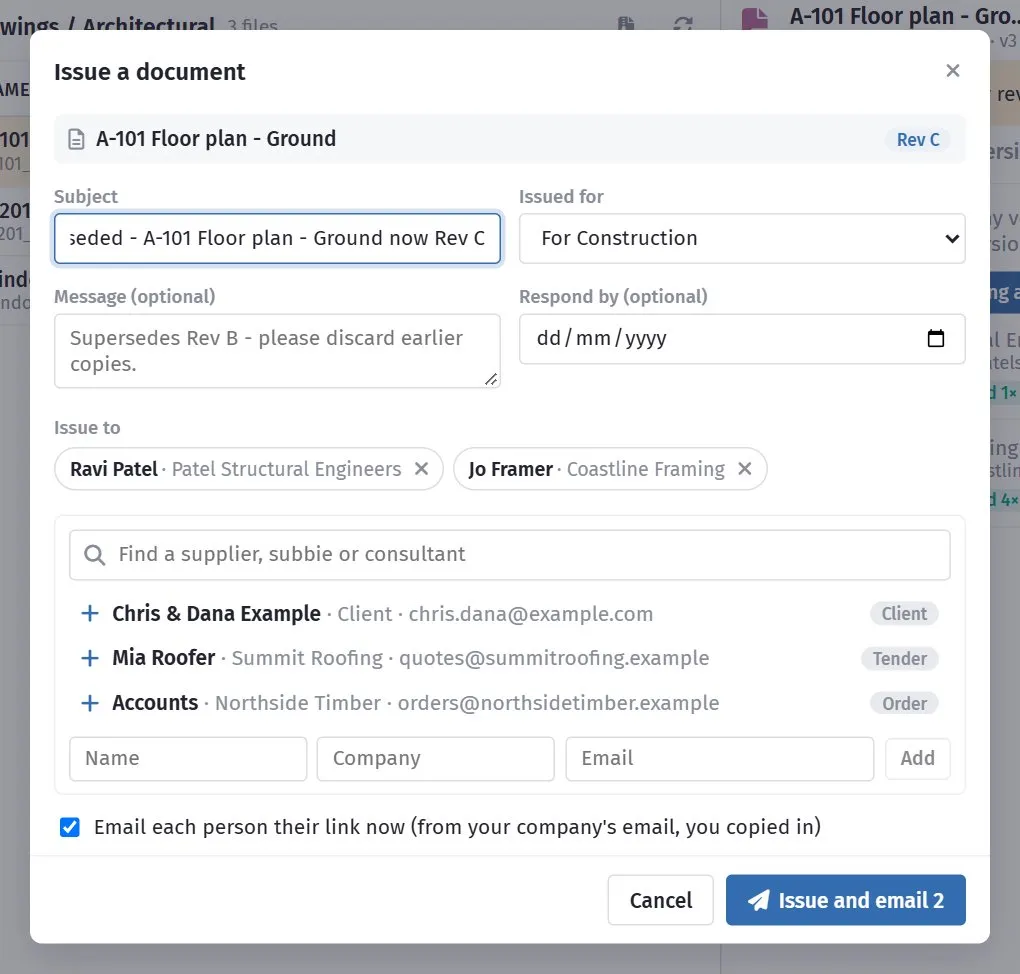
The documents and revisions at the top, then who it goes to.
Fill in:
| Field | What it is |
|---|---|
| Subject | What this issue is - Structural drawings - issued for construction. |
| Issued for | For Information, For Construction, For Tender, For Review / Comment, or For Approval. |
| Message | Optional - supersedes Rev B, please discard earlier copies. |
| Respond by | Optional - a date, for documents issued for review or approval. |
| Issue to | The people. Pick from the list or type someone new. |
The list suggests people already connected to the job: anyone you have issued to before, the client, the subbies invited to its tenders, and the suppliers on its orders. Type to search all your suppliers and their contacts.
Leave Email each person their link now ticked and each person gets an email from your company’s address, with you copied in - their replies come to you. Untick it to make the transmittal without emailing; you can copy each person’s link and send it yourself.
What they receive
Section titled “What they receive”Each person gets their own link - no login. It opens a page showing the transmittal number, what it is issued for, your message, and the documents exactly as issued, with a viewer and download buttons. At the top is I have received these: one click records that they have them, with their name and the time.
If a document they were sent has since been superseded, their page says so beside it.
Tracking
Section titled “Tracking”The Transmittals view lists every transmittal on the job, newest first, with how many people have opened it and acknowledged it.
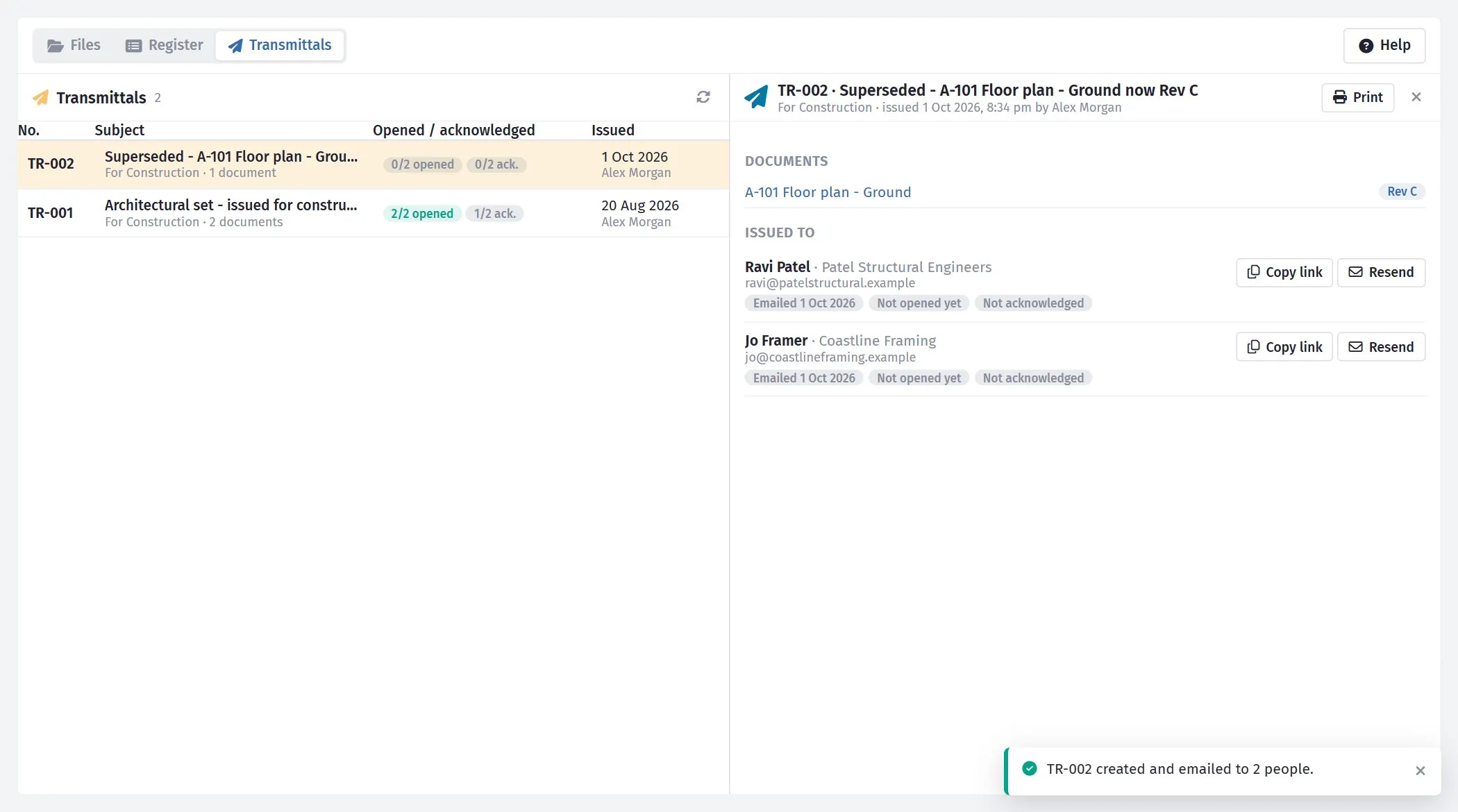
Open one to see each person’s emails, opens and acknowledgement.
Open one to see, for each person:
- whether the email went (and why not, if it failed),
- how many times they opened it, and when last,
- whether they acknowledged it.
Copy link puts their personal link on your clipboard; Resend emails it to them again.
Print gives the transmittal sheet - documents, revisions, recipients, opens and acknowledgements - to print or save as a PDF for the job file.
Who holds which revision
Section titled “Who holds which revision”Every document has an Issued tab listing everyone who was sent any version of it, on a transmittal or a share link, and whether what they hold is current or superseded.
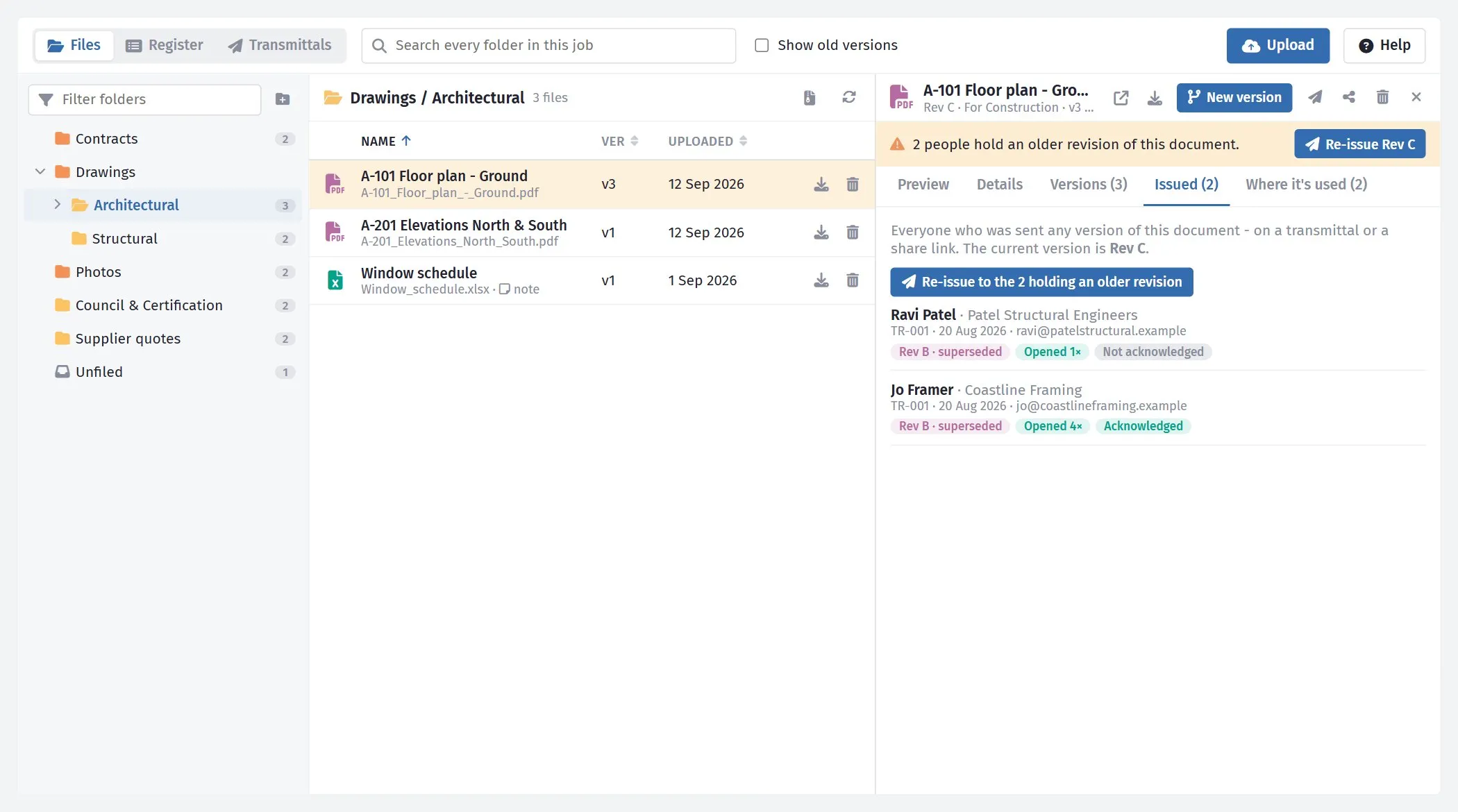
Two people hold Rev B; the current revision is C.
Re-issuing a superseded drawing
Section titled “Re-issuing a superseded drawing”When you upload a new version, SmarteBuild works out who still has an older revision and shows them straight away:
- everyone sent it on a transmittal,
- everyone sent it by a share link, and
- the supplier on every purchase order that was sent with it attached.
Orders not yet sent are not on the list - they move to the new version by themselves and go out with it.
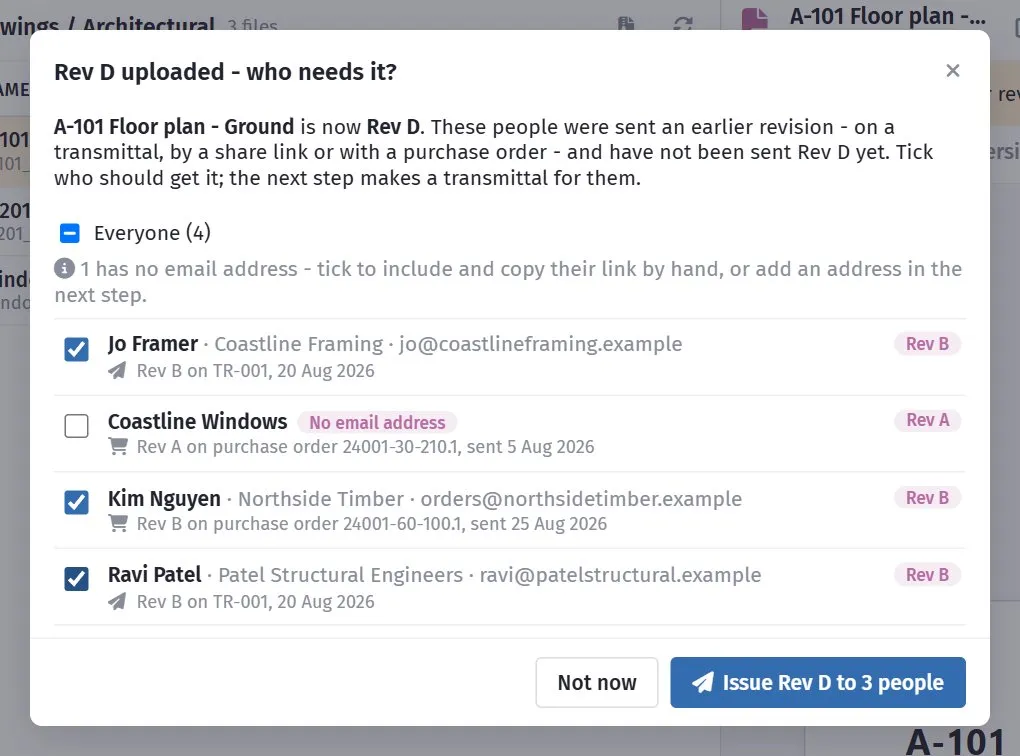
Each person once, with every older copy they were sent - here two on a transmittal and two suppliers on purchase orders.
Everyone with an email address is ticked. Untick anyone who doesn’t need it, then click Issue Rev D to 3 people. The transmittal window opens already filled in - the new revision, those people, a subject saying it is superseded and a message asking them to discard earlier copies. Check it and issue.
Someone with no email address (a supplier on an old order, say) can still be ticked. They go on the transmittal like everyone else but are not emailed - copy their link from the transmittal and send it yourself, or add their address in the transmittal window.
Click Not now to do it later. Until everyone has the current revision, the document shows a warning - 4 people hold an older revision of this document - with a Re-issue button that opens the same list. The Issued tab lists everyone who was ever sent the document, how and which revision.
Transmittals or share links?
Section titled “Transmittals or share links?”| Use | When |
|---|---|
| Transmittal | Issuing drawings or documents someone will build, price or certify from - you want a numbered record, the revision, and an acknowledgement. |
| Share link | Quickly letting someone look at a file or a folder - with an expiry date or view-only if needed. |