
Tracking payment
Available onBuilder
Issuing a claim is half the job. The other half is knowing which claims are outstanding, across every job, without going looking.
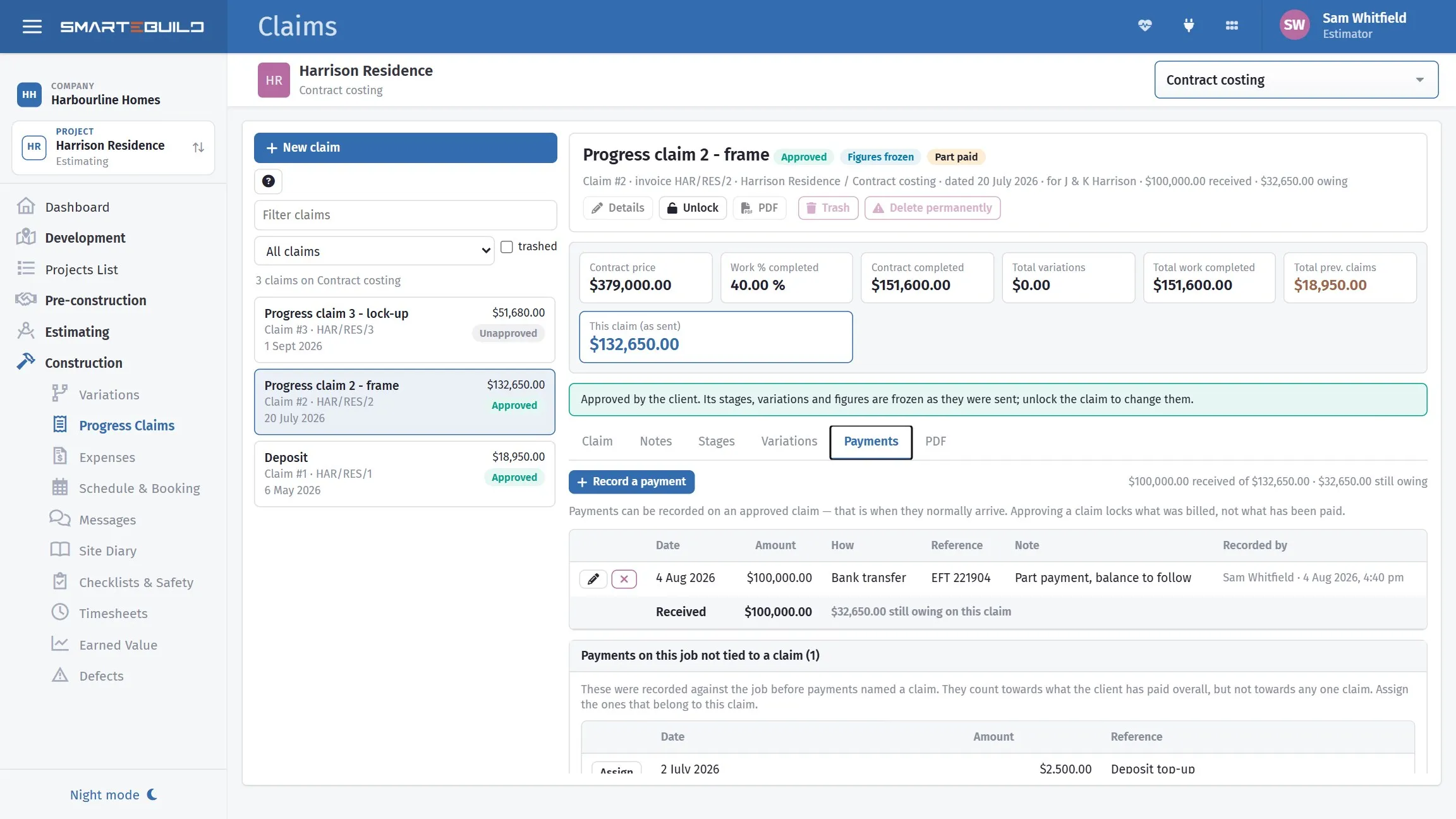
Claimed, paid and outstanding, so you know what is late.
Recording acceptance
Section titled “Recording acceptance”Client accepted this Claim marks the claim as agreed.
Tick it when the client has actually accepted — not when you sent it and not when you expect them to. An unticked claim is a visible prompt; one ticked hopefully is a claim you stop chasing for no reason.
Recording payment
Section titled “Recording payment”Accepted is not paid, and the claim shows the two separately: one pill for whether the client has approved it, a second for whether the money has arrived.
The Payments tab on the claim is where money received goes in. Record a payment asks for:
| Field | What it is |
|---|---|
| Date received | The day the money landed in your account |
| Amount | Pre-filled with what is still owing on the claim |
| How it was paid | Bank transfer, cheque, cash, card — or type your own |
| Reference | The bank reference or cheque number |
| Note | Anything worth remembering |
The reference is the field that earns its keep. In three months, reconciling a statement, it is what tells you which line is this claim.
A claim can be part paid: record what arrived, and the tab shows what is left. Record the rest when it comes and the claim turns to Paid on its own.
Overpayments are allowed, and flagged
Section titled “Overpayments are allowed, and flagged”If a payment takes the claim past what it is worth, it is recorded anyway and you get a note saying by how much. Clients round up, and one transfer sometimes covers two claims. The software does not pretend that cannot happen — but it does tell you, because the usual cause is a payment logged against the wrong claim.
The client sees the same thing
Section titled “The client sees the same thing”Whatever you record here shows on the client’s portal against the same claim: paid, part paid or due. There is one set of numbers, so you and the client cannot end up reading different states of the same claim.
Payments not tied to a claim
Section titled “Payments not tied to a claim”If the Payments tab shows payments on this job not tied to a claim, those were recorded against the job before payments named a claim. They still count towards what the client has paid overall, but not towards any one claim, so the claim they belong to still reads as owing.
Use Assign on each to put it against the right claim. Nothing guessed at them for you on purpose — deciding where your own money went is not something software should do quietly.
The claims on a job
Section titled “The claims on a job”The Claims page lists every claim on the estimate, with a search box and a filter, and the claim you pick opens beside the list. There is no list of claims across all your jobs; for that view, the Dashboard’s next claim dates card shows what is coming up to claim on every job.
| Question | How |
|---|---|
| “What is outstanding on this job?” | Open each claim’s Payments tab, or filter the list |
| “What did we invoice last month?” | Look down the claim dates on each job |
| “Which jobs are behind on claiming?” | The Dashboard’s next claim dates card |
That last one is worth doing monthly. A job whose most recent claim is two months old is either finished or is not being claimed — and the second is far more common than anyone expects.
Chasing
Section titled “Chasing”The sequence that works:
- Two days before due — a short reminder that payment falls due Friday.
- The day after due — a note that it is now outstanding, with the claim reattached.
- A week overdue — a phone call, followed by an email recording what was said.
- Beyond that — whatever your contract provides for.
Keeping the record
Section titled “Keeping the record”Record every chase — a note on the claim, or an email you have a copy of.
If a claim ever goes to adjudication or a tribunal, the question is what was claimed and when, and what the client said in response. A file that answers that in order is worth a great deal; a memory of some phone calls is not.
Watching cash across the business
Section titled “Watching cash across the business”Two numbers are worth knowing at any moment:
- Claimed and unpaid — money you have invoiced and not received.
- Built and unclaimed — work you have completed and not yet invoiced.
The first comes from each job’s Claims page. The second is the dangerous one, because it is invisible: it is jobs that have passed a stage without anyone raising the claim, plus approved variations not yet included in a claim, plus unapproved variations where the work is already built.
A monthly look down the Dashboard’s next claim dates card surfaces the first part. Reviewing the variations list surfaces the rest.
When a claim is not paid
Section titled “When a claim is not paid”If a claim goes properly overdue, deal with it under your contract rather than by continuing to build. Every week of unpaid work increases what you are carrying, and a builder who keeps going while unpaid has usually lost the leverage to stop later.
That is a commercial and legal decision rather than a software one — but the record you need to make it is on the job’s Claims page.