
Projects and estimates
Available onEstimatorBuilder
A project is one job. An estimate is one priced version of that job. Every number in SmarteBuild hangs off that distinction, so it is worth being clear on it before you create anything.
If it is new to you, read Company, project, estimate first — this article assumes it.
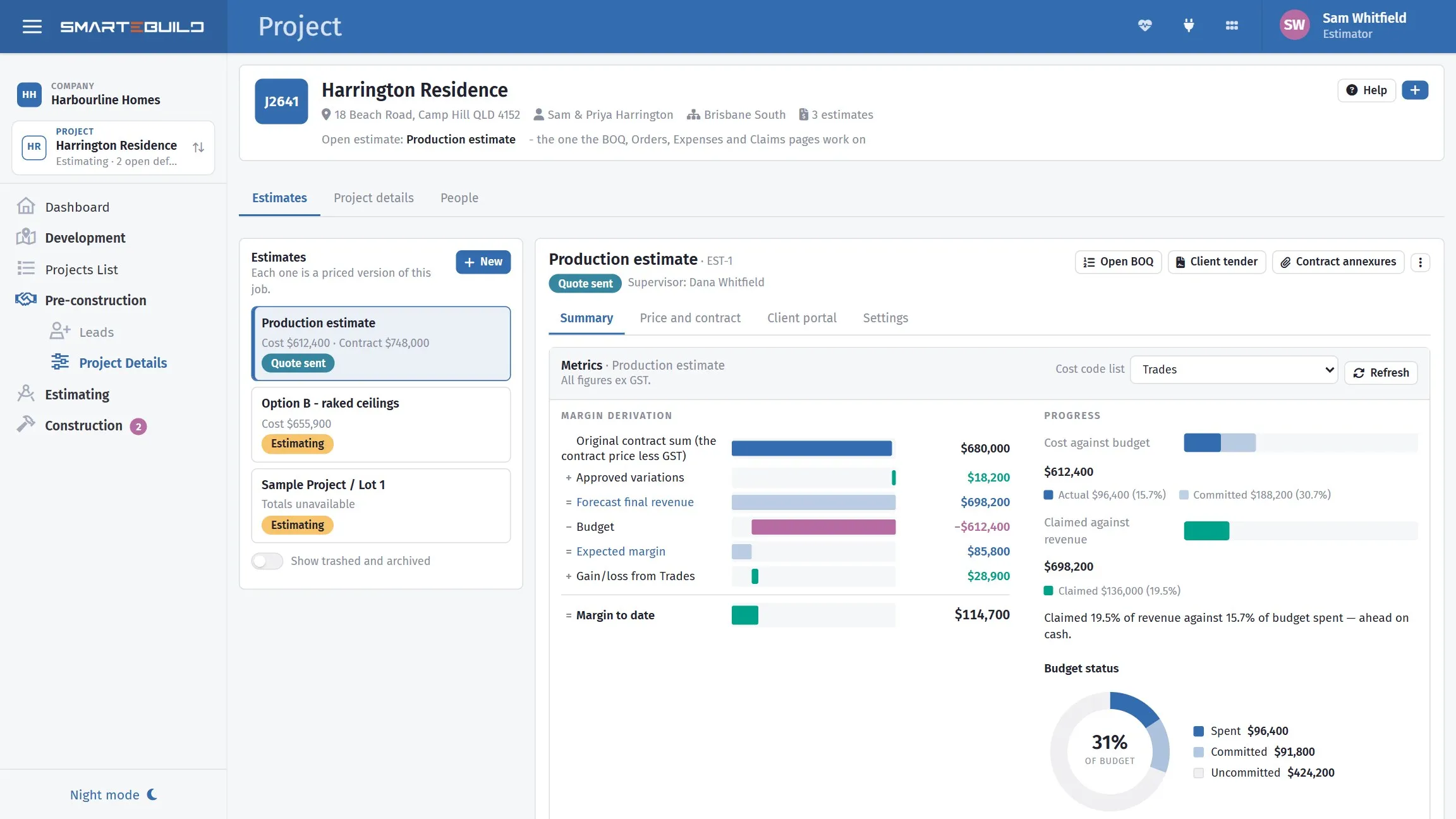
A project holds the client and the site; the estimates under it hold the money.
The Projects list
Section titled “The Projects list”Projects is where you land. One row per job — not a row per estimate — so a job you have priced four times is still one line.
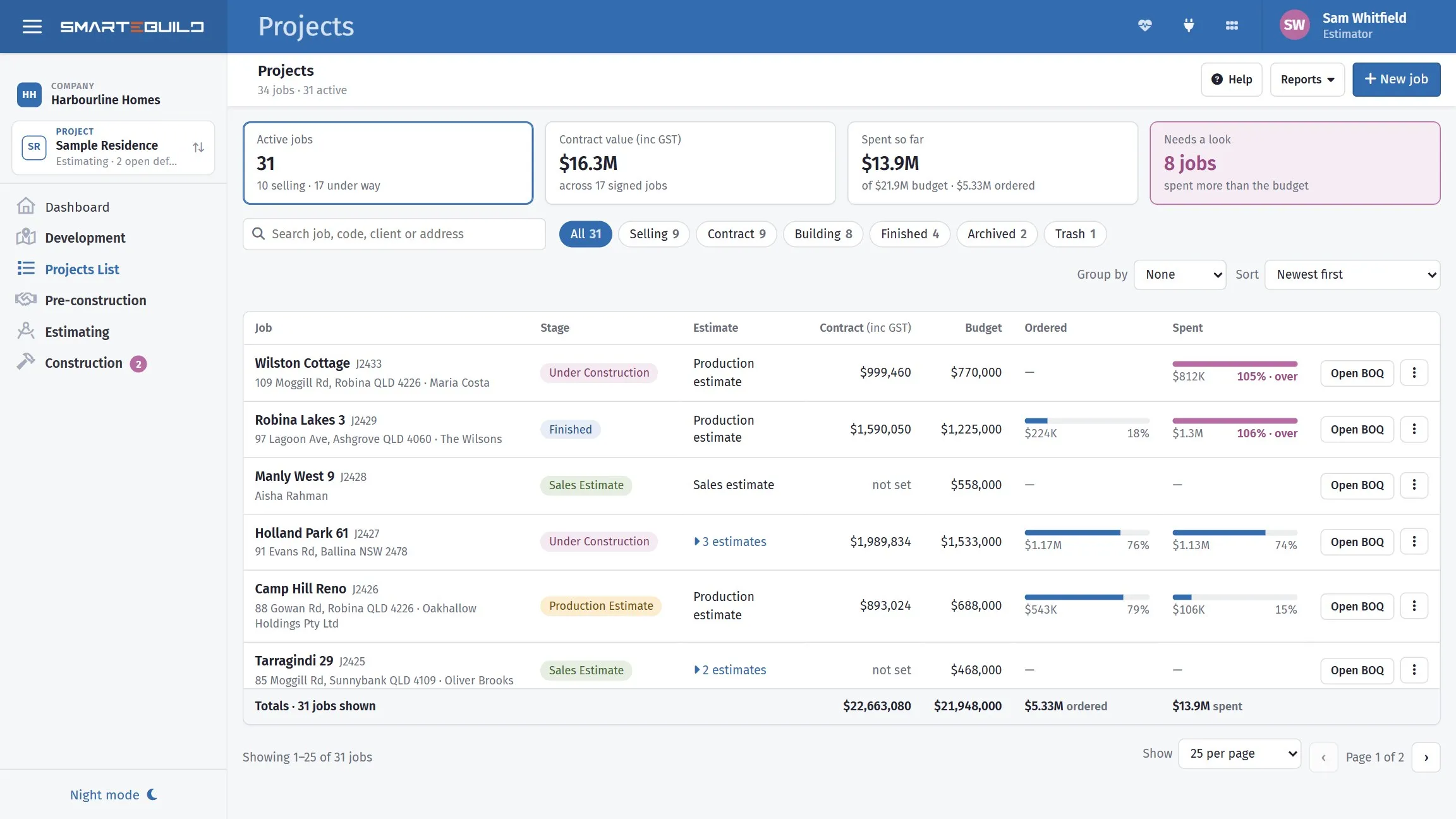
One row per job, with what is committed and spent against each budget.
Each row carries the job name and code, with the site address and client underneath, then:
| On the row | What it tells you |
|---|---|
| Stage | Selling, Contract, Building or Finished |
| Estimate | The main one. Where there are others, “3 estimates” opens them in place |
| Contract | The contract price, inc GST |
| Budget | What the main estimate allows |
| Ordered and Spent | Two bars against that budget. A bar turns pink once it passes it |
Click the row to open the job. Open BOQ goes straight to the main estimate’s bill.
Which estimate the row is showing
Section titled “Which estimate the row is showing”The main estimate is the one furthest along — Finished, then Under construction, Production, Contract specification, Tender, Sales. If two are at the same stage, the newest wins. It is marked Main when you open the estimates out.
The money on the row is that one estimate’s. The others are alternatives — a sales version, a revision, an option the client did not take — so they are deliberately not added together. Adding them would count the same house twice and make your pipeline look about double what it is.
The stage chips
Section titled “The stage chips”All, Selling (sales and tender), Contract (contract specification and production), Building (under construction), Finished, Archived and Trash.
Sales estimates are no longer hidden. A job you have quoted and not won is still a job you spent time on, and it now sits in Selling where you can see it.
The four tiles
Section titled “The four tiles”Active jobs, Contract value (inc GST) across signed jobs, Spent so far against budget with what is ordered, and Needs a look — jobs whose spending has passed the budget. Click that one to show only those.
Finding a job
Section titled “Finding a job”Search looks in the job name, code, address, client, grouping and estimate names — so the street name or the client’s surname finds it.
Group by puts jobs under headings with subtotals: None, or any grouping you use, such as Region. This replaces the old heading pop-up.
Sort offers newest, oldest, name, job code, biggest budget, and most spent as a percentage of budget. That last one is the one to reach for when you want the jobs in trouble at the top.
The ⋮ menu
Section titled “The ⋮ menu”Open job, Open BOQ, New estimate on this job, Duplicate the main estimate, Archive job or Restore from the archive, and Move to trash or Restore from the trash.
Across the top: Help, Reports — the Budget report, the Work in progress report, and Export every estimate to Excel, which still carries all the old columns including area and rates — and New job.
Two things that changed
Section titled “Two things that changed”The totals keep themselves up to date. The two Refresh buttons are gone; you no longer have to remember to press anything to trust the numbers.
View-only access now shows up. A job you can see but not change appears in the list marked View only, rather than being missing and looking like it was deleted.
On a phone the same list arrives as cards.
Opening a project shows its estimates. Click one to open it, and the Metrics panel underneath shows how its margin is built up, cost against budget, claimed against revenue, how much of the budget is spent or committed, and which cost codes are furthest over or under. All of it is ex GST. That panel is the fastest read on whether a job is going well.
Creating things
Section titled “Creating things”The + button at the top right of the project creates either:
- New project — a new job.
- New estimate on this project — a new priced version of the project that is open.
You need a project before you can have an estimate, so on an empty account the page shows a single New project button. Straight after you create a project, the new-estimate form opens so you can add its first estimate.
The project page
Section titled “The project page”The top of the page shows the job: its name, site address, main client, where it is filed, and how many estimates it has. Below that are three tabs, one for each level:
| Tab | What it holds |
|---|---|
| Estimates | The job’s estimates on the left; the one you open on the right, with its own sections |
| Project details | Name, code, site address and GST; where the job is filed; its clients |
| People | Who can open the job and each of its estimates, in one table |
An open estimate
Section titled “An open estimate”Click an estimate in the list to open it. The estimate you open here is the one the BOQ, Orders, Expenses and Claims pages work on, and Open BOQ takes you straight to its Bill of Quantities. Everything in the right-hand box belongs to that estimate:
| Section | What it holds |
|---|---|
| Summary | Its margin, spend against budget, claims against the contract, and the cost codes furthest over or under — all ex GST |
| Price and contract | What it costs, the markups on top, the contract price (inc GST) and the stages it is claimed in |
| Settings | Its name, status, supervisor and house size, and which cost code lists it uses |
Old links keep working: Projects.aspx?T=3 still opens the markups and contract
stages, now under Price and contract.
What you can do to a project
Section titled “What you can do to a project”| Action | What happens |
|---|---|
| Archive | Hidden from the default list, fully recoverable. Use it for finished jobs. |
| Trash | Marked deleted and hidden, still recoverable. |
| Delete Permanently | Gone, with everything under it. |
These are in the ⋮ menu on the Project details panel (Project details tab). The open estimate has its own ⋮ menu: Edit details, Duplicate, Move to trash (or Restore from trash) and Delete permanently.
To see archived projects again, tick Show Archived in the project filters. For estimates, switch on Show trashed and archived under the list of estimates.