
Sending and tracking
Available onEstimatorBuilder
Sending is one action; tracking is the part that determines whether you get three comparable prices or one late one.
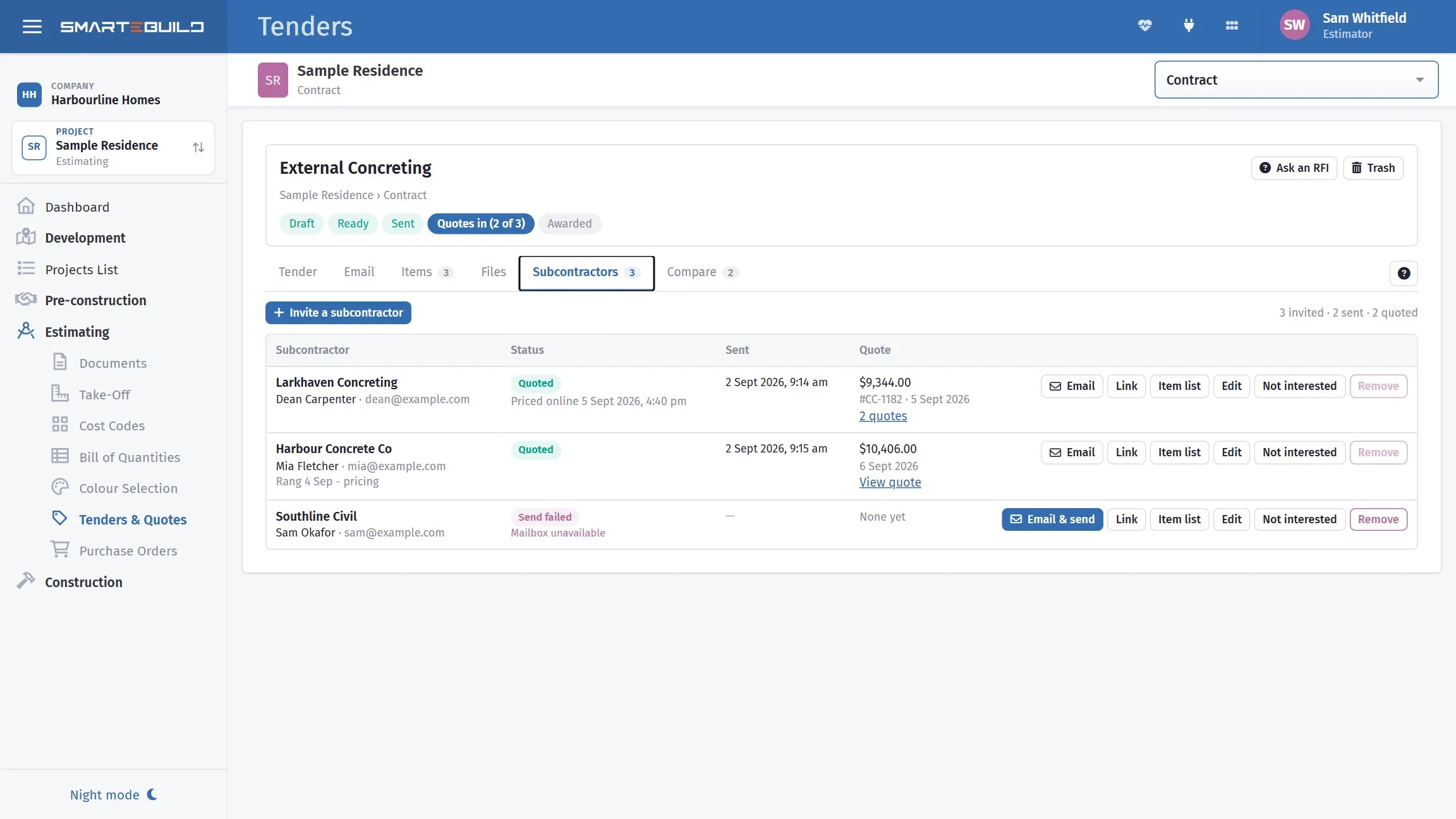
Sent is not quoted, and this is where the difference shows.
Sending
Section titled “Sending”Each subcontractor is sent their own email from the Subcontractors tab: press Email & send on their row. The email opens as they will see it — the placeholders filled in with their name and your project, and the attachments listed underneath — so you can check it before it goes.
Nothing can be sent until the tender is ticked Ready to send on the Tender tab. That is deliberate: it stops a half-built package going out by accident.
After Send, the page watches for the email to go and then shows Sent, or Send failed with the reason the mail server gave — usually a mistyped or full mailbox. You can close the email while it sends; the send carries on. Send again delivers another copy.
Replies come to you. When the tender goes out from SmarteBuild’s tenders mailbox, a subcontractor who presses plain Reply — not Reply All — reaches whoever sent the tender, and whoever created it if that is someone else. Both are copied on the email as well. The email shows who under Replies go to. Sent from your own address, replies come to you as they always have.
An email can be changed until it is sent: Edit this email, or Use the tender’s email to start again from the tender’s version. Once sent, it stays as the record of what they received.
Each recipient gets their own bid, so each sees only their own invitation. Use ;
between addresses in CC and BCC where you are copying more than one person at
a supplier.
BCC yourself. It gives you a timestamped copy outside SmarteBuild, which is occasionally what settles “we never received it”.
Every invitation carries the subcontractor’s own quote link. It is added to the end of
your message automatically, or you can place it yourself by typing $QuoteLink$. It opens
a page where they price your items and attach their own quote, with no login - see
What subcontractors see.
Link on their row copies that link, for the phone call where they cannot find the email — paste it into a text message.
Tracking
Section titled “Tracking”
One line each: whether the invitation went, when, and what came back. The third here never arrived — Send failed · Mailbox unavailable — which is worth catching before you wonder why they have not quoted.
The Subcontractors tab shows each one and where they stand:
| Status | Means |
|---|---|
| Not sent | Invited, but the email has not gone |
| Sending… | The email is on its way |
| Sent | Delivered to the mail server; the date is in the Sent column |
| Send failed | The reason is shown underneath. Fix it and send again |
| Quoted | A quote has come back — its amount, number and date are shown |
| Not interested | You recorded that they will not price it |
| Awarded | Their quote was selected on Compare |
Priced online with a date appears under the status when they used their quote link. If they quoted more than once, 2 quotes opens the history; the newest is the one compared.
Across the top of the tender, a progress line reads Draft → Ready → Sent → Quotes in (2 of 3) → Awarded, so you can tell where a tender is without opening a tab.
Watch two things:
Nobody has responded and the deadline is close. Usually the invitation went to a mailbox nobody reads. Ring, do not send a second email.
Only one has responded. You have a price, not a comparison. Better to extend the deadline for everyone than to award on a single bid.
Following up
Section titled “Following up”A simple sequence:
| When | Do |
|---|---|
| Two days after sending | Confirm receipt, by phone if there has been no acknowledgement |
| Halfway to the deadline | Ask whether they are pricing it and whether anything is unclear |
| Two days before | Remind, and ask if they need longer |
| Deadline | Chase anything outstanding |
Follow up on a subcontractor’s row in the tender list sends the reminder for you, with the files attached again, and notes that it went. The wording can be loaded from one of your templates or saved as one, What they’ll see shows it filled in for that person before it goes, and Send me a copy keeps one in your inbox.
The halfway call is the valuable one. It surfaces the questions a subcontractor was going to ask on the last afternoon, and it tells you early if they have decided not to price — while you can still invite someone else.
Questions that affect everyone
Section titled “Questions that affect everyone”If one subcontractor asks something that changes how the work is priced, tell all of them.
Two reasons. The bids stay comparable, because everyone priced the same understanding. And the subcontractor who asked the good question is not penalised for it — which is how you stay someone people ask questions of.
Send update on the tender’s header in the tender list does exactly that: one email to everyone already sent the tender, with only the files you tick, and a note on every row that it went.
Extending a deadline
Section titled “Extending a deadline”Extend for everybody, and say so. A deadline quietly extended for one bidder is unfair, and it gets back to the others.
Re-issued drawings mid-tender
Section titled “Re-issued drawings mid-tender”If the drawings change while a tender is out, Send update with the new revision uploaded and ticked, and a clear note of what changed and whether the deadline has moved. The revision is attached to the tender as well, so anyone invited later gets it.
Do not assume a subcontractor will notice a revision letter. Say what changed.
When bids come back
Section titled “When bids come back”Prices arrive as bids against the tender, and can be brought into the bill from there — carrying a Related bid link back to the source. See Comparing bids and awarding.