
Channels, groups and files
Available onBuilder
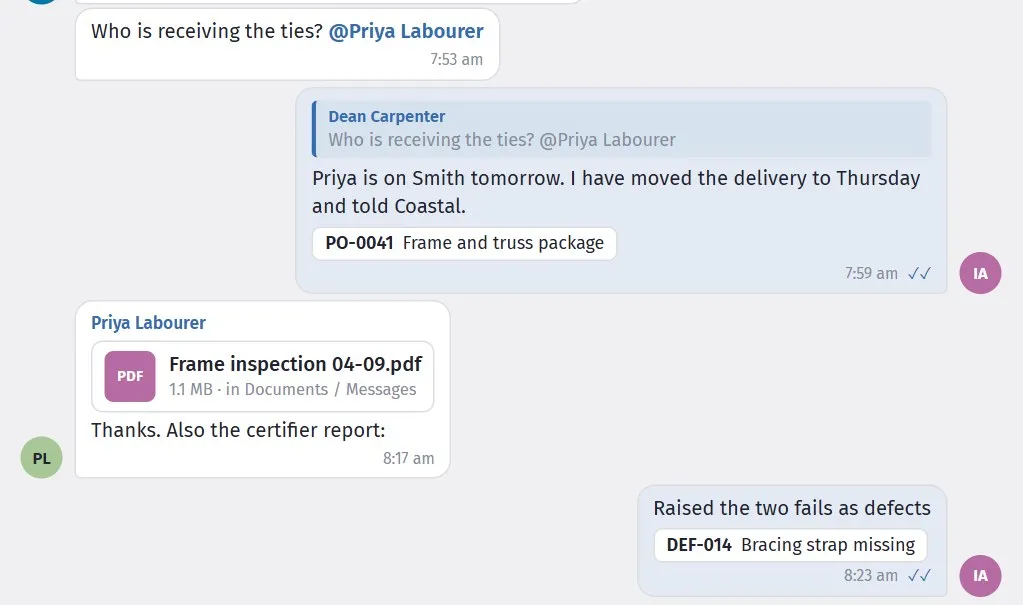
A mention, a reply, the order it is about, a file filed into Documents, and a defect raised from the conversation.
Starting a conversation
Section titled “Starting a conversation”New chat creates a group or a direct message.
Give a group a name people will recognise — Frame crew, 18 Beach Rd — client,
Site managers. Search your team finds the people to add.
About sets what the conversation is about: one of your jobs, or No job (general conversation). This applies to direct messages as well as groups. Started from This job, it is already set to the job you are in.
Edit group changes the name and membership later.
One conversation per person, per job
Section titled “One conversation per person, per job”A direct message is kept separately for each job. If you message Dean about 18 Beach Road and later about 4 Hill Street, those are two conversations, each listed under its own job, so a question about one job is never buried among messages about another.
Choose No job for anything that is not about a particular job — leave, a tool that needs replacing, a catch-up. That is your general conversation with that person, and there is one of those too.
Starting a conversation you already have reopens it: the same person and the same job (or no job) always lead back to the same place.
The heading of every conversation shows the job it is about, or No job · general conversation. In All, each row carries the job’s name (or No job), which is how you tell two conversations with the same person apart.
Linked to a job
Section titled “Linked to a job”A linked conversation appears with the job, which is what makes it findable a year later by someone who was not part of it.
It also means the right people are obvious. A channel on 18 Beach Road is for people working on 18 Beach Road, rather than a group somebody assembled once and never updated.
Files and photos
Section titled “Files and photos”Attach a file or photo, or drag one onto the conversation.
Attachments stay with the job. A photo of the flashing detail sent in March is still there in October when somebody asks how it was done — which is not true of the same photo in a text message.
People and files shows who is in a conversation and what has been shared in it, which is usually the fastest way back to a document somebody sent.
Searching
Section titled “Searching”Search messages, people and files covers all three.
This is the feature that justifies the module over a group chat. Questions like “what did the engineer say about the footing depth?” or “who did we use for the waterproofing on Ridge Street?” have answers, and finding them takes seconds rather than scrolling.
Search is also why it is worth writing slightly more than you would in a text. A message that says “Barwon confirmed the pour for Thursday 7am” is findable; “yep all good” is not.
Pinning and muting
Section titled “Pinning and muting”Pin keeps a conversation at the top — useful for the job you are on this week.
Mute stops notifications from one you do not need to follow minute by minute. It does not leave the conversation; you still see it when you look.
Muting is the pressure valve. Without it, people leave noisy channels entirely and then miss the message that mattered.
Who can see what
Section titled “Who can see what”A conversation is visible to the people in it. For a job-linked channel, that follows who is working on the job.
A conversation about a job is only for people on that job. This covers the job’s groups and direct messages as well as its General chat:
- In New chat, once a job is chosen, the people list shows only those who have access to it. A line under the list says how many of your team are not on the job.
- The same goes for Edit group on a job’s group.
- Someone who is taken off a job stops seeing that job’s conversations. Put them back on the job and the conversations, with their history, are there again.
To bring someone into a job’s conversation, give them access to the job first — see People, in Project settings. To talk to someone who is not on the job, choose No job: a general conversation has no such limit.
Before posting anything commercial — margin, a subcontractor’s performance, a view about the client — check who is in the conversation. Project access is often broader than people assume: consultants, client representatives and subcontractor supervisors are sometimes given access so they can see documents or the schedule.
If in doubt, use a direct message or a named group rather than the job channel.
Message removed
Section titled “Message removed”A message can be removed, and shows as Message removed rather than vanishing.
Only the person who wrote a message can remove it, and only within an hour of sending it. Nobody else can, not even an administrator, so what a colleague or a client said stays on the record.
That is deliberate — a conversation with silent gaps is not a record. Removing a message deals with the mistake without pretending it never happened.
Imported from Feeds
Section titled “Imported from Feeds”Older material carried over from the Feeds module is marked Imported from Feeds.
It is read-only history. Everything new happens in Messages.