
Getting client approval
Available onBuilder
A variation is only worth what you can prove the client agreed to. Sending it and recording the acceptance is the part that protects you.
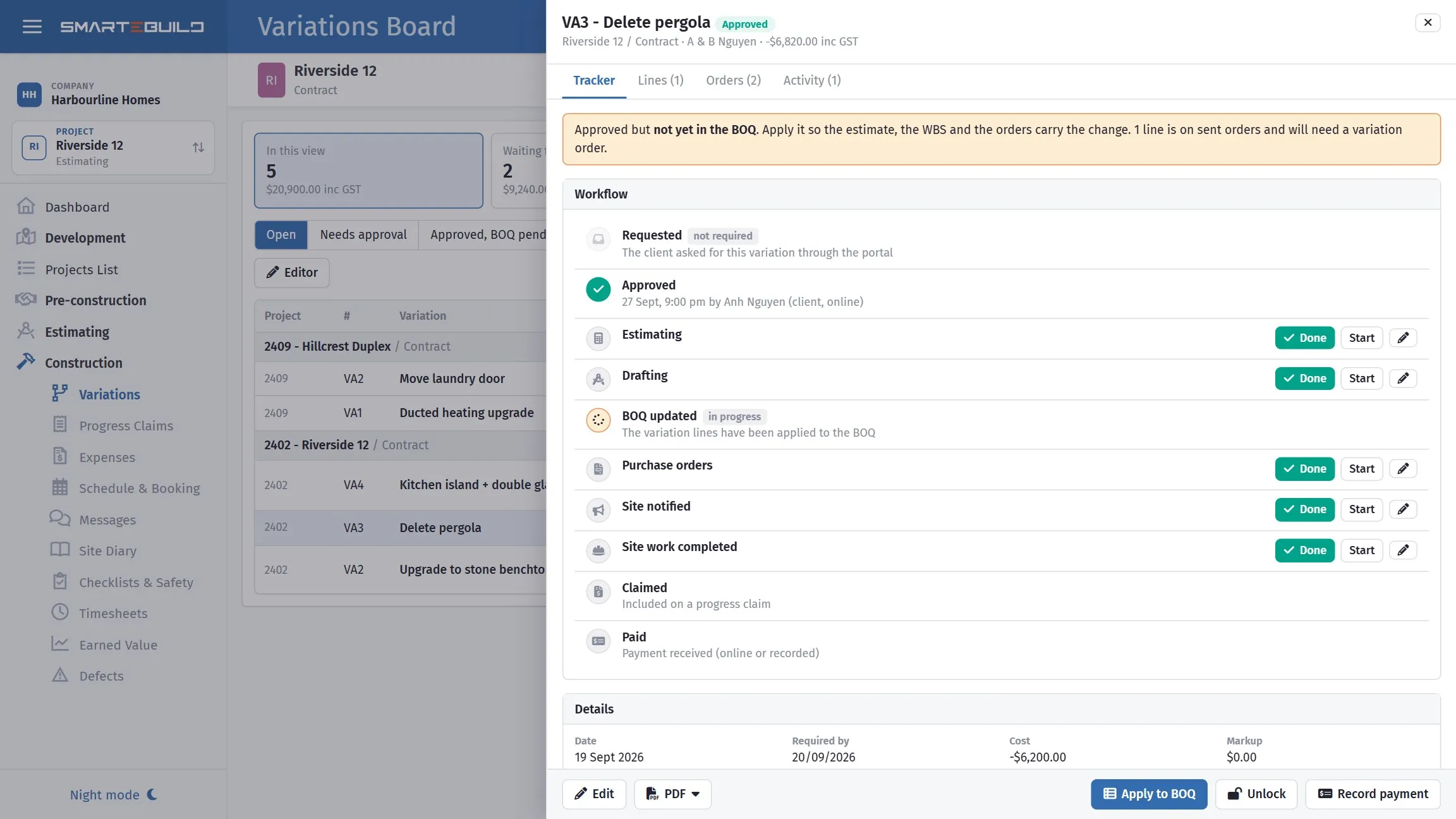
The typed name, the time and the device are stored as the signature.
Sending it
Section titled “Sending it”The Email tab carries To, From, CC, BCC, Subject and Message, and Attach the variation PDF, which is ticked for you — leave it on unless the client has asked for the figures in the body of the email instead.
Sending runs in the background. The tab says “Sending… this refreshes by itself”, and it does — you do not have to sit on the screen, and pressing send a second time is how clients end up with two copies.
The recipient defaults to the client email on the project — see Clients. Check it is the person who makes decisions. On a couple building a house, send to both.
The variation needs a client, and the client needs an email address, before Send will do anything — it tells you which is missing rather than sending. Fix it under the project’s clients and send again.
The covering email
Section titled “The covering email”Keep it short and make the ask explicit:
Hi Andrew and Jane,
Attached is variation 04 covering the tapware you selected last week. The contract carried a $1,200 allowance and the fittings you have chosen come to $1,900, so the variation is for the $700 difference plus margin and GST — $862.40 in total.
Could you approve this by Friday? The plumber is on site the following Monday and I would rather not hold him up.
Three things that email does: states what changed, shows the allowance being credited, and gives a deadline with a reason. Vagueness on any of the three is what turns a two-day approval into a three-week one.
The client portal
Section titled “The client portal”As well as receiving the variation by email, the client can approve it on their client portal — the single private page that also carries their documents, selections, claims and photos.
That is usually the faster route to a decision. A client who is already on the page looking at their selections can approve a variation without finding an email, printing anything or replying to the right thread.
Everything below still applies. However the approval arrives, it needs recording and chasing the same way. See Client portal.
Recording acceptance
Section titled “Recording acceptance”Accepted by client marks the variation as approved.
Tick it when you have the approval, not when you expect it. An unticked variation is a visible reminder that money is outstanding; one ticked optimistically is invisible and unclaimable evidence of nothing.
Where your contract requires signed approval, keep the signed copy — attach it, or file it — and use the tick to reflect that it exists.
When work has to start first
Section titled “When work has to start first”It happens. The client says go ahead on site, the excavator is idling, and the paperwork has not caught up.
Do this, in order:
- Raise the variation the same day, even if it is an estimate.
- Email it immediately, and say the work is proceeding on their verbal instruction.
- Ask for written confirmation — even a one-line reply is enough.
- Update it with the final cost once known.
The email in step two is the point. It converts a verbal instruction into a written record with a timestamp, sent by you, that they did not dispute. That is a far stronger position than a memory of a conversation on site.
Chasing approvals
Section titled “Chasing approvals”Unapproved variations are money you have possibly spent and definitely cannot claim. Review them at every progress claim:
- Anything unapproved and older than a fortnight gets chased.
- Anything unapproved where the work is already built gets chased urgently.
- Anything the client has refused gets resolved, not left open.
The variations list filters by acceptance, so this is one filter and a look. See The variations list.
Bank account details
Section titled “Bank account details”Variations carry Bank Account details for payment, the same as claims.
Set this once and check it appears correctly on the first variation you issue. It is the sort of field that is wrong quietly for months, and the symptom is a client who says they paid.
Approving online
Section titled “Approving online”Instead of waiting for a reply to the email, give the client a link. On the variation’s tracker (Tracker button on the Variations page, or Open in tracker on the variation’s menu) the Client links panel has Create next to the client link. Copy it into your email, or send it from your phone.
The client sees the variation laid out for them: the lines, the totals, the extension of time, a Download the PDF link, and an Approve box. They type their full name, tick that they have read it, and approve. That typed name, the time and the address of the device they used are stored on the variation as the signature, and the variation locks itself the same way a ticked Approved does here.
You are told two ways: the bell at the top of every page gets a Variation approved online entry, and the variation’s Activity tab in the tracker records who approved it and when.
If the client has questions instead, I have questions / decline sends their note back to you. The variation stays open, the tracker shows it as Declined with their reason, and the same link still works once you have revised it and they are ready to approve.
Online approval does not change the estimate by itself. Someone with the Apply Variations to BOQ and Orders permission presses Apply to BOQ on the tracker, so the estimator sees the change before it lands. See Applying a variation to the BOQ.