
Tasks
Available onBuilder
Tasks are the unit of everything in this module. The Tasks view is the list of them.
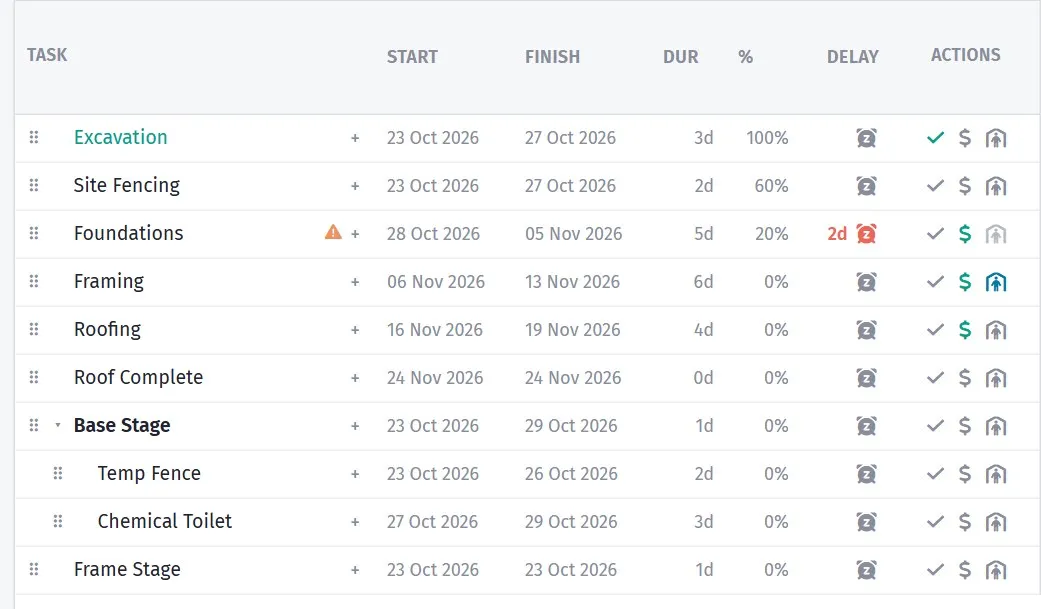
Each task with its dates, its trade and how far along it is.
The fields
Section titled “The fields”| Field | What it does |
|---|---|
| Name | What the work is |
| Parent | Groups it under a summary task |
| Duration | How long it takes |
| Start Date | When it is planned to start |
| Actual Start Date | When it actually started |
| Actual Finish Date | When it actually finished |
| Predecessor | What has to happen first |
| Link type | How the two are tied: finish to start, start to start, finish to finish or start to finish - see Link types |
| Lag | Waiting time added to the link |
| Status | Where it is up to |
| Cost Code | Which trade it belongs to |
| Supplier | Who is doing it |
| Contact | Who at that supplier |
| Cost / Select Cost Method | What it costs |
| Link to Order | The purchase order for this work |
| Call up (weeks) | How far ahead to call the trade |
| Note | Anything else |
| Sorting Index | Order among siblings |
Structure
Section titled “Structure”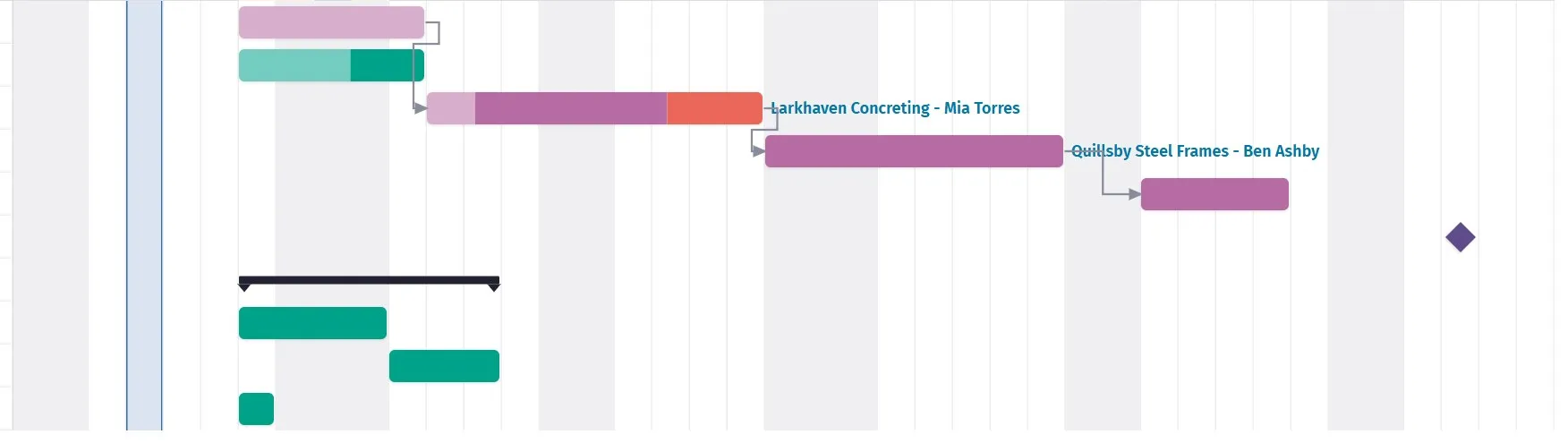
A dependency is what makes the finish date tell the truth.
Parent builds a hierarchy — a summary task with the real work underneath it.
Frame Frame — ground floor Frame — first floor Frame inspectionRoof Roof trusses Roof battens Roof tilesSummary tasks roll up their children’s dates and costs, so you get a readable overview that still has real detail behind it.
Keep it two levels for a house. Deeper structures look organised and take longer to maintain than they save.
Naming
Section titled “Naming”Name a task so that someone reading it in a call-up sheet knows what to bring.
| Weak | Better |
|---|---|
Concrete |
Slab pour — 18.6 m³ N32 |
Plumber |
Plumbing rough-in — ground floor |
Fix out |
Internal doors and architraves |
The call-up sheet carries this name to the subcontractor. Concrete on a Tuesday
tells them nothing about whether they are pouring or stripping formwork.
The task panel’s Details tab has a Notes box for anything that does not fit a field — the gate code, “pump booked with Metro”, “client wants to be there”. It saves when you click away. Notes also come out in the Export tasks to Excel report.
Deleting a task
Section titled “Deleting a task”Delete task asks before anything goes. For a group — a task with sub-tasks — it asks which you mean:
- Delete the group only - keep its tasks — only the heading goes; the tasks under it move up to the top level of the schedule and keep their dates and links.
- Delete the group and everything in it — the whole branch goes.
Deleted the wrong thing? Undo on the top toolbar brings it back — see Undo.
Tasks from purchase orders
Section titled “Tasks from purchase orders”Schedule › Add tasks from purchase orders… gives every purchase order on this job that has no task yet a task of its own. It skips orders that are deleted, voided or merged.
Each new task:
- is named after the order;
- is connected to the order at 100%, so its cost and trade come from the order;
- goes at the foot of the schedule, with the number of days you choose.
Nothing already in the schedule changes, and pressing it again adds nothing new — so it is safe to run whenever orders have been raised since. Link the new tasks into the programme afterwards. You need the See Orders permission to use it.
Actual dates
Section titled “Actual dates”Actual Start Date and Actual Finish Date are what turn the schedule from a plan into a record.
Fill them in as the job runs. Two things follow: the schedule moves to where the job really is, so slippage shows against your baseline rather than being assumed; and at the end of the job you have real durations, which is the best source of estimates for the next one.
Status
Section titled “Status”Status tracks where a task is. Combined with the view filters, it is what keeps a long schedule readable:
| Filter | Shows |
|---|---|
| Hide Finished Tasks | Only what is left |
| Show Due Tasks | What is coming up |
| Show Finished Tasks | The record of what is done |
Hide Finished Tasks is the one to leave on while running a job. Six months in, two-thirds of the schedule is history and it only gets in the way.
Keeping it current
Section titled “Keeping it current”A schedule nobody updates is worse than no schedule, because people rely on it.
The minimum that works:
- Mark tasks finished as they finish.
- Enter actual start dates when work begins.
- When something slips, change it in the Schedule view so dependencies follow.
- Add tasks for variation work as it is approved.
Ten minutes a week. Step three is the one that matters — updating a date in the Tasks list changes one task, while doing it in the Gantt moves everything that depends on it. See Building a schedule.