
Archiving and deleting
Available onEstimatorBuilder
There are three ways to take a project off your list, and they are not interchangeable. Two are reversible; one is not.
The three actions
Section titled “The three actions”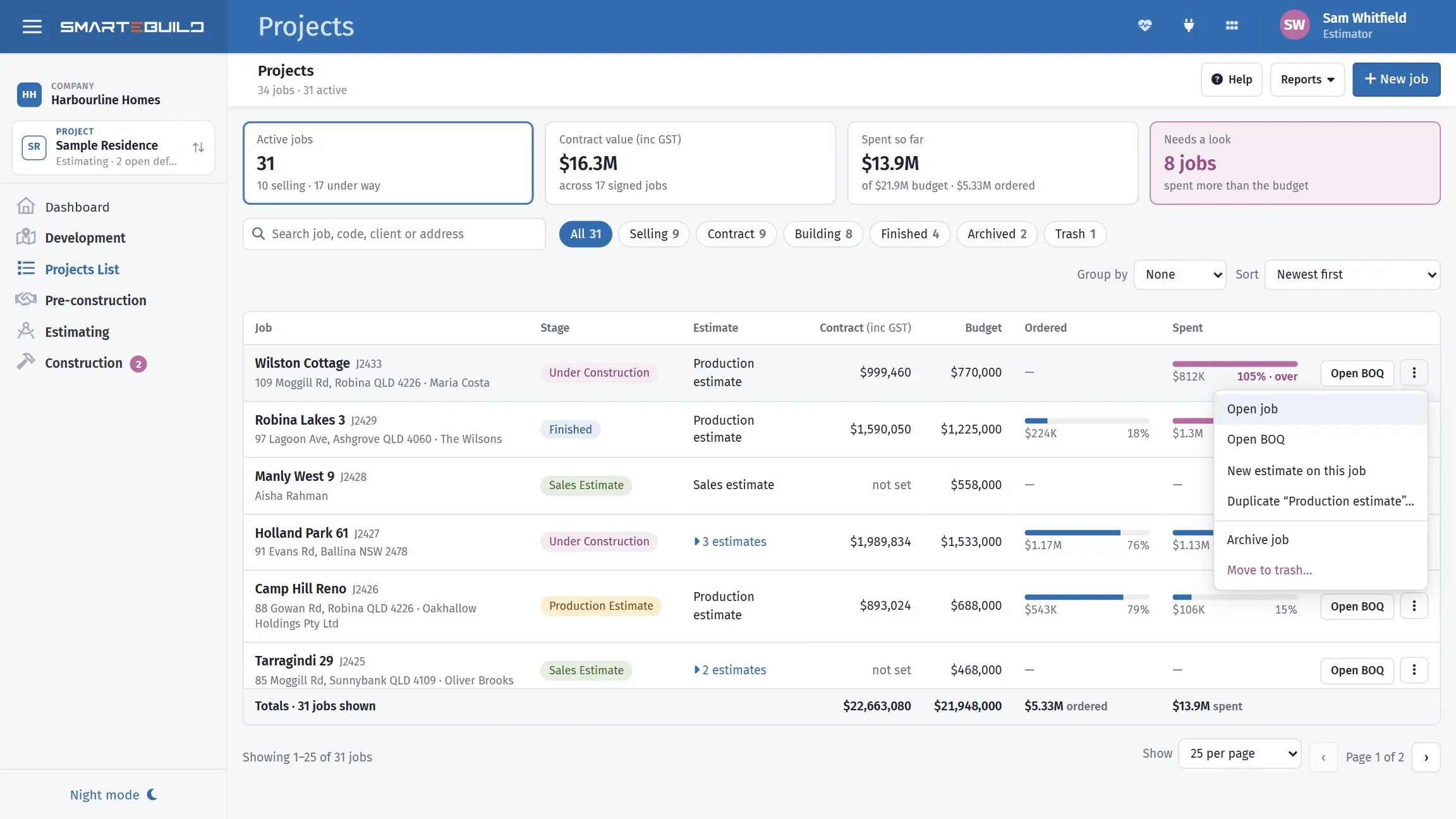
Archive and Move to trash sit on each job in the list, both reversible. Delete Permanently is not on this menu — the one action you cannot undo is not one click from the list.
| Action | Reversible | Use it when |
|---|---|---|
| Archive | Yes | The job is finished and you want it out of the way |
| Trash | Yes | You think you are done with it but are not certain |
| Delete Permanently | No | It was created in error and contains nothing you need |
Estimates have their own Duplicate and Delete Permanently, so a single priced version can be removed without touching the project or its siblings.
Archive is what you usually want
Section titled “Archive is what you usually want”A finished job still holds things you will want later: what it cost, what the variations were, which subcontractor did the roof, what you paid for the windows. That history is the most useful pricing data you own.
Archiving keeps all of it and removes the job from your day-to-day list. Tick Show Archived to see archived jobs again, and un-archive any of them.
What Delete Permanently takes with it
Section titled “What Delete Permanently takes with it”Deleting a project permanently removes everything underneath it:
- every estimate
- every Bill of Quantities and all its items
- every take-off measurement
- every purchase order, expense, variation and progress claim
- the schedule, defects and the project feed
- documents attached to the project
To make sure it is the right one, Delete permanently asks you to type the project’s or estimate’s name first; the button stays greyed out until the name matches.
A permanent delete is all or nothing. If it cannot finish, for any reason, nothing is removed and the project or estimate is exactly as it was. Reload the page and try again, or contact support.
Some things are kept even after a permanent delete, because they belong to something else:
- Leads that became this job stay in your Leads list, no longer linked to it.
- Xero export history stays, so your accounts still match.
- A line on another job’s order, quote or invoice that pointed at a deleted item keeps its description and amount. It only loses the link.
When SmarteBuild refuses to delete
Section titled “When SmarteBuild refuses to delete”A project or estimate that has safety incident records or timesheet entries cannot be deleted permanently. The law requires you to keep safety records and wage records, so SmarteBuild will not remove them with the job. You will see a message saying which one applies, and nothing is removed. Archive the estimate instead.
Getting something back
Section titled “Getting something back”| You did | To recover |
|---|---|
| Archived a project | Tick Show Archived, select it, un-archive |
| Trashed a project | Tick Show Archived, select it, restore |
| Archived or trashed an estimate | Switch on Show trashed and archived under the list of estimates, then Restore from trash in its menu, or untick Estimate is archived under Edit details |
| Deleted permanently | Nothing. Contact SmarteBuild support to ask about backups. |
Before you delete a project
Section titled “Before you delete a project”Worth doing first, if there is any doubt:
- Export any reports you might want — cost summaries, the final BOQ.
- Export marked-up take-off PDFs, if the measurements matter as a record.
- Check whether any other job was duplicated from this one and still refers to it.
- Archive it and wait a month. If nobody has asked for it by then, delete it.
Step four costs nothing. Permanent deletion is almost never urgent.