
The report library
Reports turn what is in the system into documents — for clients, subcontractors, lenders and your own office.
They are reached from the Reports menu within the module the report belongs to, rather than from one central place. That takes a moment to get used to and makes sense once you do: the reports about your bill live in the Bill of Quantities.
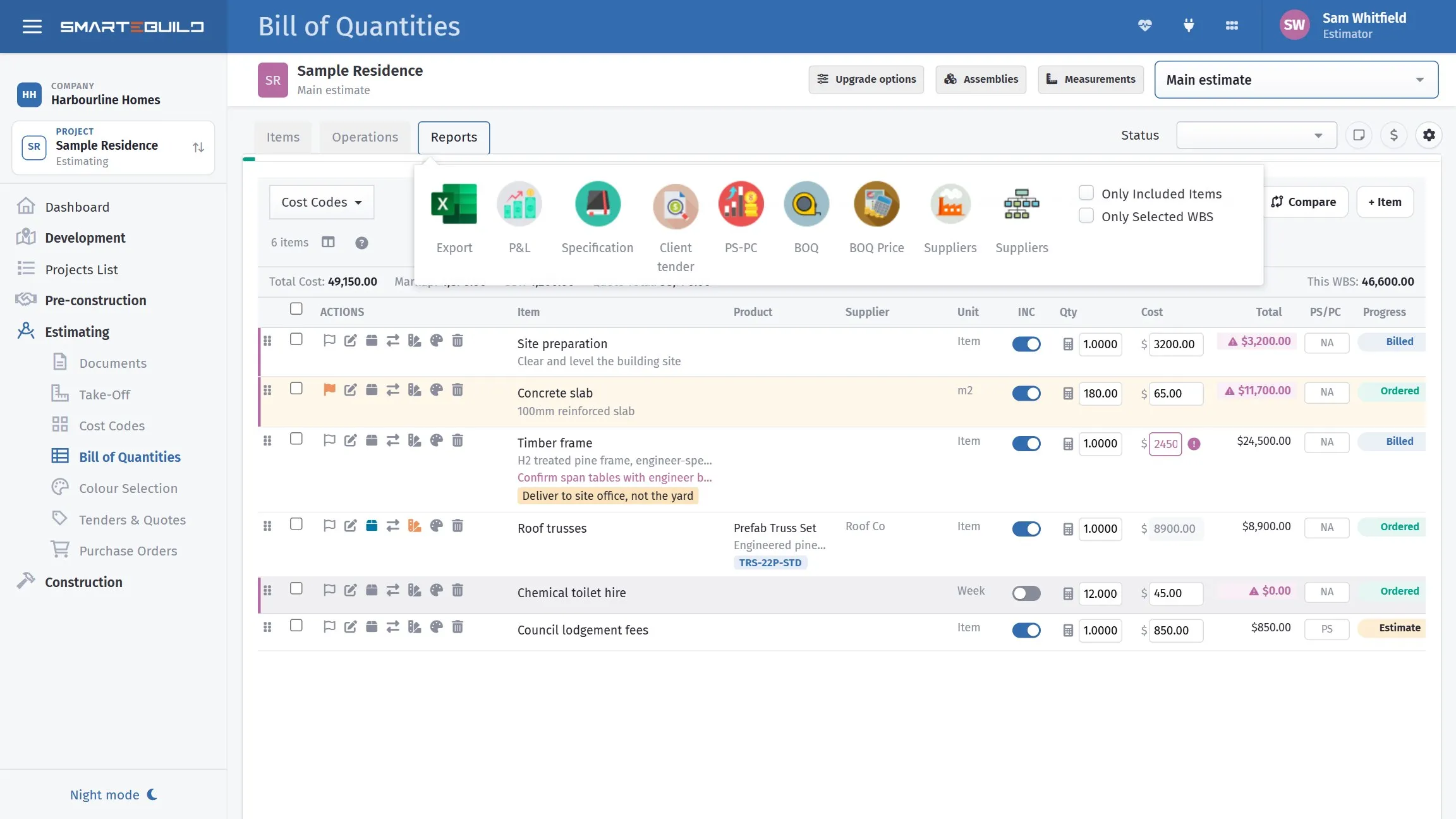
Each module’s own Reports menu. This is the one on the Bill of Quantities.
Where to look
Section titled “Where to look”| You want | Look in |
|---|---|
| Estimate totals, the detailed bill, the specification | Bill of Quantities |
| Committed cost, orders by supplier | Purchase Orders list |
| What you have been charged | Expenses list |
| Claims raised and outstanding | Each job’s Claims page |
| Variations schedule | Variations list |
| Programme and the Gantt | Schedule |
| Defect lists | Defects |
| Selections schedule | Colour Selection |
| Cost against budget for a job | Estimate metrics on the Projects list |
Which report answers which question
Section titled “Which report answers which question”The questions builders actually ask, and where the answer is:
“What are we quoting?” — the estimate summary from the BOQ.
“Have we missed anything?” — the estimate summary read in build sequence. A trade with an implausibly small total is a trade with items missing.
“Is this job making money?” — cost against budget, read by trade rather than by job total. The job-level number hides a trade over and a trade under. See Cost to date against budget.
“What have we committed?” — the orders list, grouped by supplier.
“What are we owed?” — each job’s Claims page, and the Dashboard’s next claim dates card across every job.
“What has the client been charged in variations?” — the variations list, filtered to the estimate, with the running total.
“When will we finish?” — the Gantt. Nothing else answers it, because nothing else understands dependencies.
Filter before you produce
Section titled “Filter before you produce”Every report reflects the current state and your current filters.
Before producing one, check:
- The right estimate is selected, on a job with more than one
- Only Included Items matches what you intend to show
- Switched-off options are switched the way you mean
- Any project filter is not hiding something
A report produced with a filter you had forgotten about is wrong in a way that looks entirely plausible.
Before an estimate report goes out
Section titled “Before an estimate report goes out”- Clear your Flags — anything flagged is unresolved.
- Run Show Orphan Items — an orphan is in the total but in no trade.
- Check the trade subtotals add to the job total.
- Confirm the right options are switched on.
Two minutes, and it catches most of what goes wrong in a bill.
Sending them
Section titled “Sending them”See Exporting and sharing — and in particular, what must never leave your office.