
Creating a variation
Available onBuilder
The Variations screen is the estimate’s list on the left and the selected variation on the right, with four tabs: Lines, Notes, Files and Email. The Tracker & approval button opens the same drawer the Variations Board uses: approval, applying to the BOQ, the client links and the activity log.
Three ways to start one:
- New variation on the Variations screen: name, number, date, client, bank account and extension of time, then add lines.
- From the BOQ: tick the items on the Bill of Quantities, open the bulk menu and choose Variation. Pick add (one line per item at the quantity you type, defaulting to the BOQ quantity) or take out (a credit at the BOQ quantity). The variation opens in the editor, priced from the items with the default markup, ready for wording and markup.
- From the colour schedule: Create variation from selections makes one with a line per upgrade above allowance — see Running a selection.
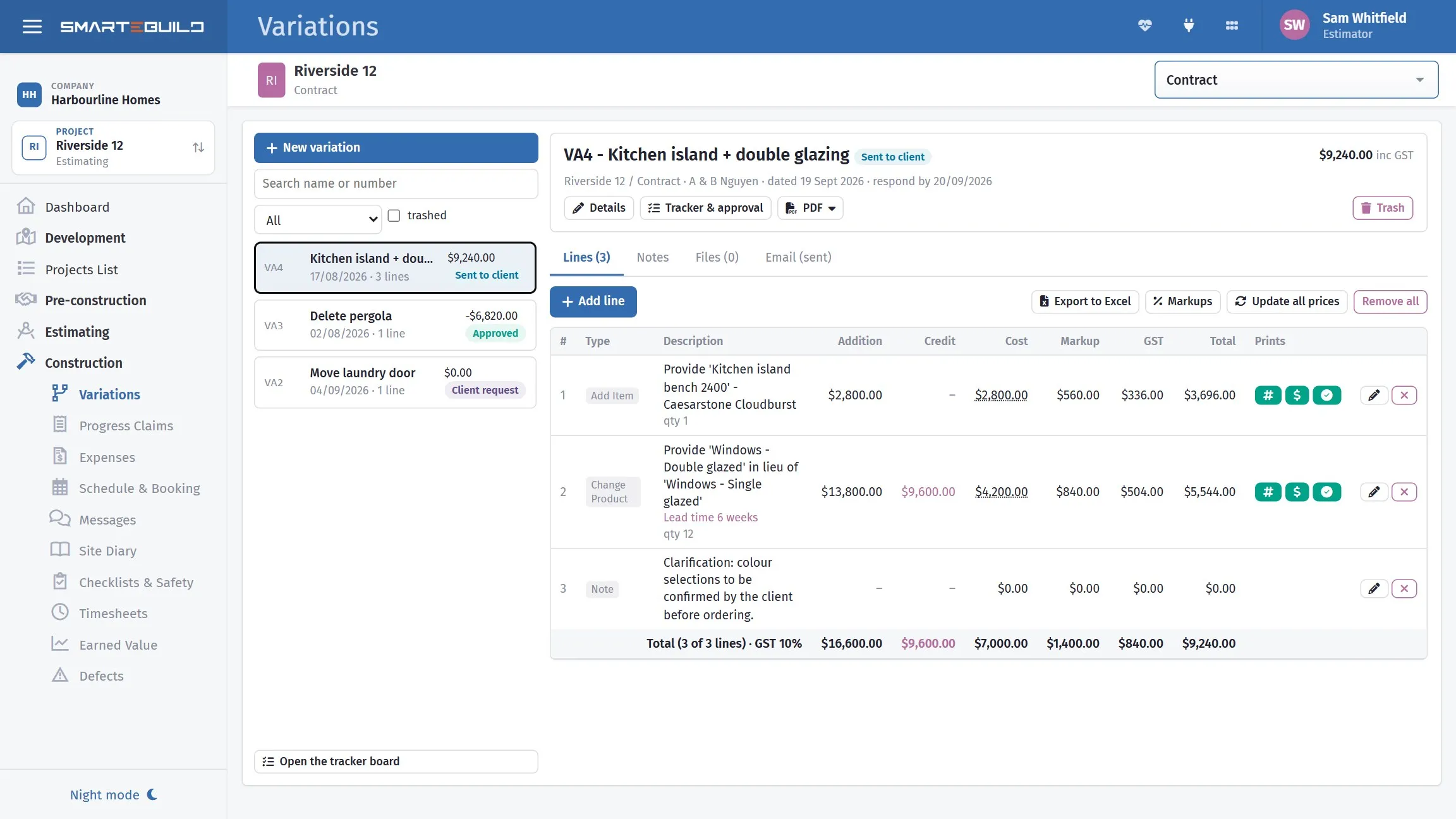
Describe the change, price it, and send it for approval.
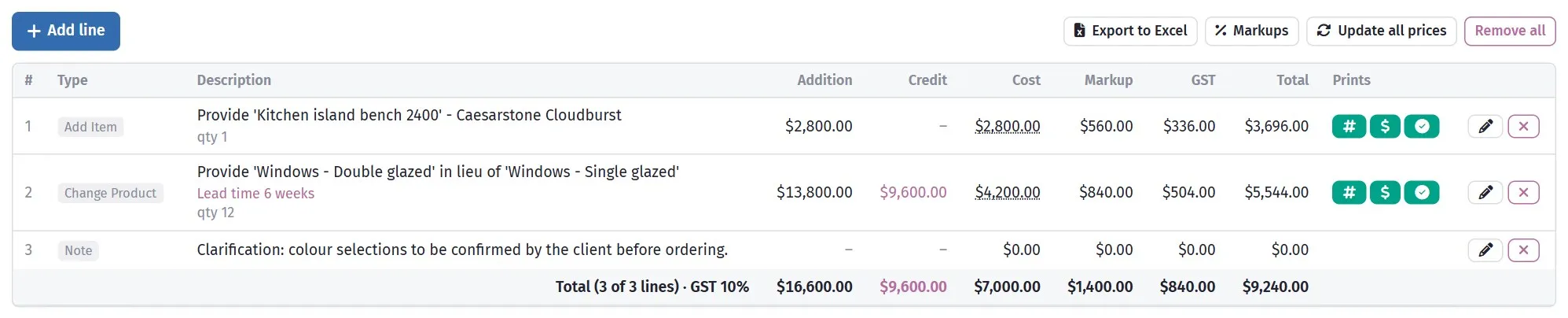
Lines carry their own quantities and rates, exactly like the bill.
Every line has a type, and the type decides how it is priced and what happens in the BOQ when the variation is applied:
| Type | Priced as | Applied to the BOQ as |
|---|---|---|
| Add Item | cost × quantity | the item included, or its quantity increased |
| Remove Item | a credit of cost × quantity | the item marked not included |
| Change Product | new product × qty less old product × qty | the item’s product swapped |
| Change Item | new item less old item | old item out, new item in |
| Note | nothing | nothing — text that prints |
| Combined | the net of its item changes (see below) | every change made, as if each were its own line |
Pick the cost code, then the item — or leave the cost code on whole estimate and search by name. Choosing an item fills in its quantity and product. Write description from the items builds the wording from the type’s template (“Provide X in lieu of Y”); edit it — it is what the client reads.
The grid shows each line’s Addition (what it puts in: new items, products or extra quantity) and Credit (what it takes out, at cost). Cost is the addition less the credit, so a product change that adds $13,800 of double glazing and credits $9,600 of single glazing costs $4,200. The totals row adds up both columns. A cost you type over by hand shows as an addition if it is positive and a credit if it is negative.
Export to Excel (above the grid) downloads the lines as a spreadsheet: the variation’s details at the top, then every column in the grid, plus the note, internal comment, quantity and whether the price and quantity print, whether the line counts toward the total, and whether it has been applied to the BOQ. Amounts are numbers, so they add up in Excel. A combined line’s item changes are listed in italics beneath it for reference; the line above them carries the price. Without permission to see variation costs, the Addition, Credit, Cost and Markup columns are left out.
The line window
Section titled “The line window”Add line, or Edit on a line, opens a window with three tabs and a summary column:
- Items: the line type and row, then what changes - the item (searched by cost code or across the whole estimate), its product and quantity, and for a change the product or item it changes to. A combined line lists its item changes here.
- Wording: the description the client reads (Write it from the items drafts it from the line type’s wording), the note that prints in red, the internal comment, and the line’s picture.
- Pricing & printing: the markup structure, Round the price up, and the three switches - whether the line counts toward the total, and whether its price and quantity print on the PDF. A line that does not count still prints; use it for a clarification with an indicative figure.
The Line summary on the right shows additions, credit, cost, markup, GST and the total inc GST, plus the rounding and what prints. It reads as saved until you change an item, quantity, markup or rounding, then becomes a live estimate from the estimate’s figures; the exact amounts are set when you save with Save & update prices. Save, keep prices stores the wording and switches without touching the figures.
Each line carries a markup structure (a percentage; manage them with Markups).
The markup goes on what the line adds, not on what it credits: a line that adds $1,000.00 of work at 20% carries $200.00 markup; a −$1,000.00 credit carries none and is passed on at cost. A change of product is marked up on the new product only, and a combined line on its additions only - so a change that nets a credit still carries the markup on the new work in it. This is the No markup on credits tick box on the Pricing & printing tab, ticked by default; untick it when a line should be marked up on its net cost instead (credits included), the way the older variations were priced.
A new line starts with no markup chosen; the window will not save it until you pick one on the Pricing & printing tab, and the Line summary shows “Markup · not set” until you do.
Round the price up, beside the markup, rounds the line’s total (inc GST) up to the dollar, the next $10, the next $100 or the next $1,000 - the same choice the sales upgrade options have. A line priced at $1,032.20 with “to the next $10” becomes $1,040.00; the extra goes into the line’s markup, so cost, markup, GST and total still add up on the grid, the PDF and any claim. The rounding is applied whenever the line’s prices are updated (saving with Save & update prices, Update all prices, or typing a cost), and Not rounded turns it off again. Only a price is rounded: a line that nets a credit is left exactly at its cost plus GST, so −$550.00 stays −$605.00.
Copying a variation to another estimate
Section titled “Copying a variation to another estimate”A project often has more than one estimate - a sales estimate and the production estimate it became, for example - and a variation priced on one may need to live on the other. Copy to estimate at the top of the variation offers the project’s other estimates; the copy is a new draft there with the same lines, prices, markups, notes and email wording. Nothing of the approval, sending, BOQ application or payment comes across.
Each line’s items are matched to the other estimate’s items: through the duplicate-estimate link when one estimate was duplicated from the other, or by the item’s name. A line whose item cannot be matched keeps its wording and price but loses its item link; the copy window lists those lines, and each carries an internal comment saying so. Open the copy and pick the item again on those lines before applying the variation to the BOQ. A locked estimate (under construction or finished) cannot take a copy.
The variation PDF
Section titled “The variation PDF”PDF (at the top of the variation, and on the tracker) offers three layouts:
- Quantity and price: each line with its quantity and its total (the Adjustment column), then the Subtotal and the four summary tiles (Additions, Credit, Net excl. GST, Total incl. GST). This is the standard variation document.
- Detailed: the same document with Addition, Credit and GST columns added beside the quantity and total, so the client sees exactly what goes in and what comes out on every line.
- Quantity, price and picture: the standard document with a Picture column. Each line shows its own picture if you uploaded one on the line (see below); otherwise, a line that changes to, adds or removes a product shows that product’s picture - the one on the product in the estimate, or on the price list product it came from. A line with neither shows an empty space. Rows are taller to fit the pictures, so this layout runs to more pages.
A picture on a line
Section titled “A picture on a line”Open the line (or add one) and use the Picture section on its Wording tab: Choose a picture (JPG, PNG, GIF or BMP), then save the line. The picture is stored with the line, shows as a small thumbnail in the lines grid, and prints in the Picture column of the Quantity, price and picture PDF - on any line type, including notes and combined lines, and whether or not the line has a product. Replace picture swaps it; Remove picture takes it off, and the product’s picture (if it has one) shows again. Pictures are not copied when a variation is duplicated.
The Email tab has the same choice under Attach the variation PDF, so the email carries whichever layout you pick; the client link and the email use Quantity and price unless you choose otherwise. A line whose price is switched off shows no figures but its description still prints.
Save & update prices recomputes the line from the items’ current costs; Save, keep prices keeps a cost you typed over. Click a cost in the grid to override it; Recalculate in that dialog goes back to the computed figure. Update all prices does every line at once.
Use items wherever you can. A variation built from priced items carries the same rates and descriptions you used in the contract, which makes it far harder for a client to argue you have priced the change opportunistically.
Combined lines: several changes, one line
Section titled “Combined lines: several changes, one line”Some changes touch several items but read to the client as one decision: “replace the carpet and tiles with timber flooring”. A Combined line holds all of those item changes and shows the client one line with one price.
- Add line and set the type to Combined.
- Under Item changes in this line, choose Remove or Add, then pick the cost code or search the estimate for the item. Repeat for every item.
- Adjust any quantity or product in the list. The running total shows additions, removals and the net cost.
- Write description from the items drafts one sentence, e.g. “Provide timber floor supply and timber floor installation in lieu of tile supply, tiling, carpet and underlay.” Edit it; it is all the client sees.
| Item change | Qty | Cost |
|---|---|---|
| Remove tile supply | 18 m² | −$1,260.00 |
| Remove tiling | 18 m² | −$1,080.00 |
| Remove carpet | 42 m² | −$1,890.00 |
| Remove underlay | 42 m² | −$420.00 |
| Add timber floor supply | 60 m² | $5,400.00 |
| Add timber floor installation | 60 m² | $2,700.00 |
| Net cost | $3,450.00 |
The markup goes on the line’s additions only, like every other line: the timber supply and installation, $8,100.00, at 20% is $1,620.00 markup; the four removals carry none. The line is $3,450.00 + $1,620.00 = $5,070.00 ex GST.
The client, the PDF and the claim all see one line. Apply to BOQ still makes every change: the four items are marked not included and the two timber items are added or increased. Revert undoes all of them. Each item can appear once per combined line.
Worked example: a PC allowance exceeded
Section titled “Worked example: a PC allowance exceeded”The Hendricks contract carries a prime cost allowance of $1,200 for tapware. The client selects fittings estimate $1,900.
| Line | Value |
|---|---|
| Tapware selected by client | $1,900.00 |
| Less PC allowance included in contract | −$1,200.00 |
| Net cost | $700.00 |
| Margin 12% | $84.00 |
| Variation total, ex GST | $784.00 |
| GST | $78.40 |
| Variation total | $862.40 |
Showing the allowance as a deduction is what makes this readable. A variation that simply says “Tapware — $862.40” looks like a new charge for something the client believes they already paid for, and produces an argument. The version above shows they are paying the difference, which is what the contract said would happen.
Worked example: a credit
Section titled “Worked example: a credit”The client deletes the rear deck.
| Line | Value |
|---|---|
| Omit decking, bearers and joists | −$4,850.00 |
| Omit balustrade | −$1,240.00 |
| Omit deck footings | −$620.00 |
| Net credit, ex GST | −$6,710.00 |
| GST | −$671.00 |
| Variation total | −$7,381.00 |
Built From Item, so the credit uses exactly the rates the deck was priced at. The client cannot reasonably argue the credit is light, because it is their own contract pricing in reverse. A credit never carries markup, whatever markup structure the line has, so the client gets the full −$6,710.00 back at cost.
Writing the description
Section titled “Writing the description”Generate Description produces text from the items on the variation. It is a starting point and usually needs editing, because the client reads this and your item descriptions were written for subcontractors.
Compare:
| Generated | Better |
|---|---|
Tapware PC item adj |
Supply and install client-selected tapware in lieu of the prime cost allowance included in the contract. Allowance credited in full. |
Omit decking, bearers, joists, balustrade, footings |
Delete the rear deck in its entirety, including structure, balustrade and footings. All associated costs credited. |
State what is changing, what is included, and what is credited. A variation the client understands gets signed; one they have to interpret gets queried.
Extension of time
Section titled “Extension of time”Extension of time (days) claims programme alongside money.
Ask, for every variation: does this add time? Not just the work itself — a custom-order item with a six-week lead time adds programme even if it takes a day to install.
Claim it now. An extension of time cannot sensibly be claimed retrospectively once the completion date has passed.
Templates
Section titled “Templates”Create new template saves a variation for reuse. Worth doing for the ones that recur across jobs — rock excavation, a standard upgrade you are often asked for, a common council requirement.
The template carries the structure and wording; you set the amounts each time.
Note and email wordings
Section titled “Note and email wordings”Separately from the variation template above, the Notes tab and the Email tab each keep their own set of saved wordings. Save as new stores what is in the editor, Load brings one back, and Save to, Rename and Delete work on your own; the ones marked (system) are supplied with SmarteBuild and can be copied but not changed.
Make default sets the wording every NEW variation starts from — one for the
note, one for the email. That template then shows as - default in the list, and
the button becomes Clear default when you want new variations to start blank
again. It is a setting for the whole company and it does not change variations that
already exist. A (system) template cannot be the default; save your own copy of
one first.