
RFIs
Available onEstimatorBuilder
An RFI (request for information) is a formal question to the architect, engineer or another consultant when the drawings don’t agree or don’t say: A-101 shows the window head at 2100 but the elevation shows 2400 - which is right? Each one gets a number (RFI-001, RFI-002…), a date it should be answered by, and a record of the answer.
Why it matters
Section titled “Why it matters”A question asked by phone or in a long email chain is easy to lose, and so is the answer. When an answer changes the work, that is money: extra framing, a deeper footing, a week waiting for a decision. A numbered RFI with a dated answer is what supports the variation or the extension of time afterwards.
Raising an RFI
Section titled “Raising an RFI”Two ways in:
- Open the drawing and click the question mark at the top - the drawing is attached for you.
- In the RFIs view, click Raise an RFI.
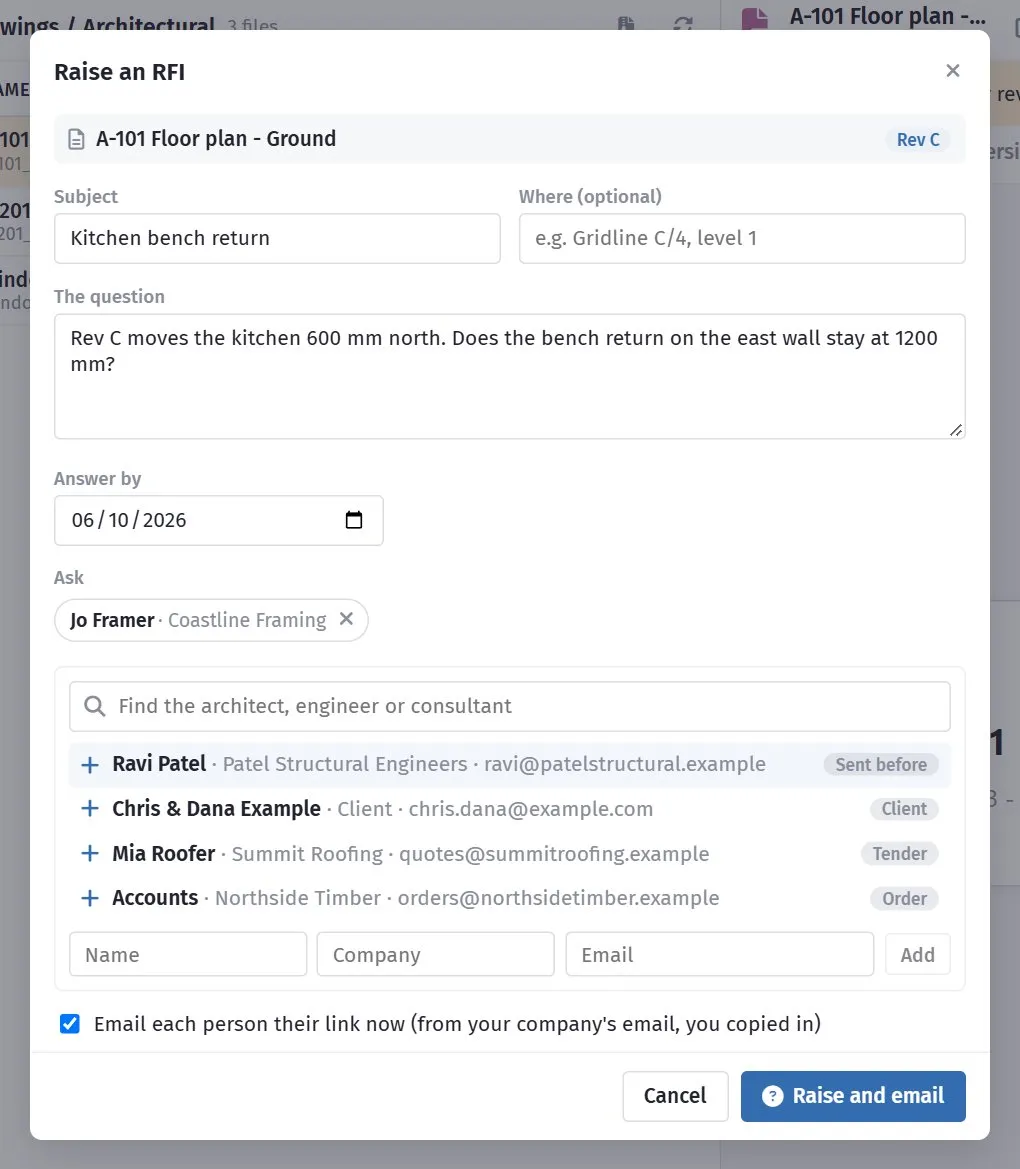
| Field | What it is |
|---|---|
| Subject | A short name - Window W4 head height. |
| Where | Optional - Gridline C/4, level 1. |
| The question | What you need to know. Say which drawings disagree. |
| Answer by | The date you need it by. Five days ahead to start with. |
| Ask | The people. Pick from the list or type someone new. |
The list suggests people already connected to the job: anyone you have sent documents to, the client, tender invitees and order suppliers. Type to search all your suppliers and their contacts.
Leave Email each person their link now ticked and each person gets an email from your company’s address, with you copied in. Untick it to raise the RFI without emailing - you can copy each person’s link from the RFI and send it yourself.
What they see
Section titled “What they see”Each person asked gets their own link - no login. It shows the question, where, the answer-by date and the drawings (with a viewer and download), and a box for their answer. They can attach files - a marked-up sketch or a revised detail. Those files are saved in the job’s RFIs folder in Documents.
When they answer, the RFI moves to Answered and the person who raised it gets an email with the answer and a link straight to it.
The RFIs view
Section titled “The RFIs view”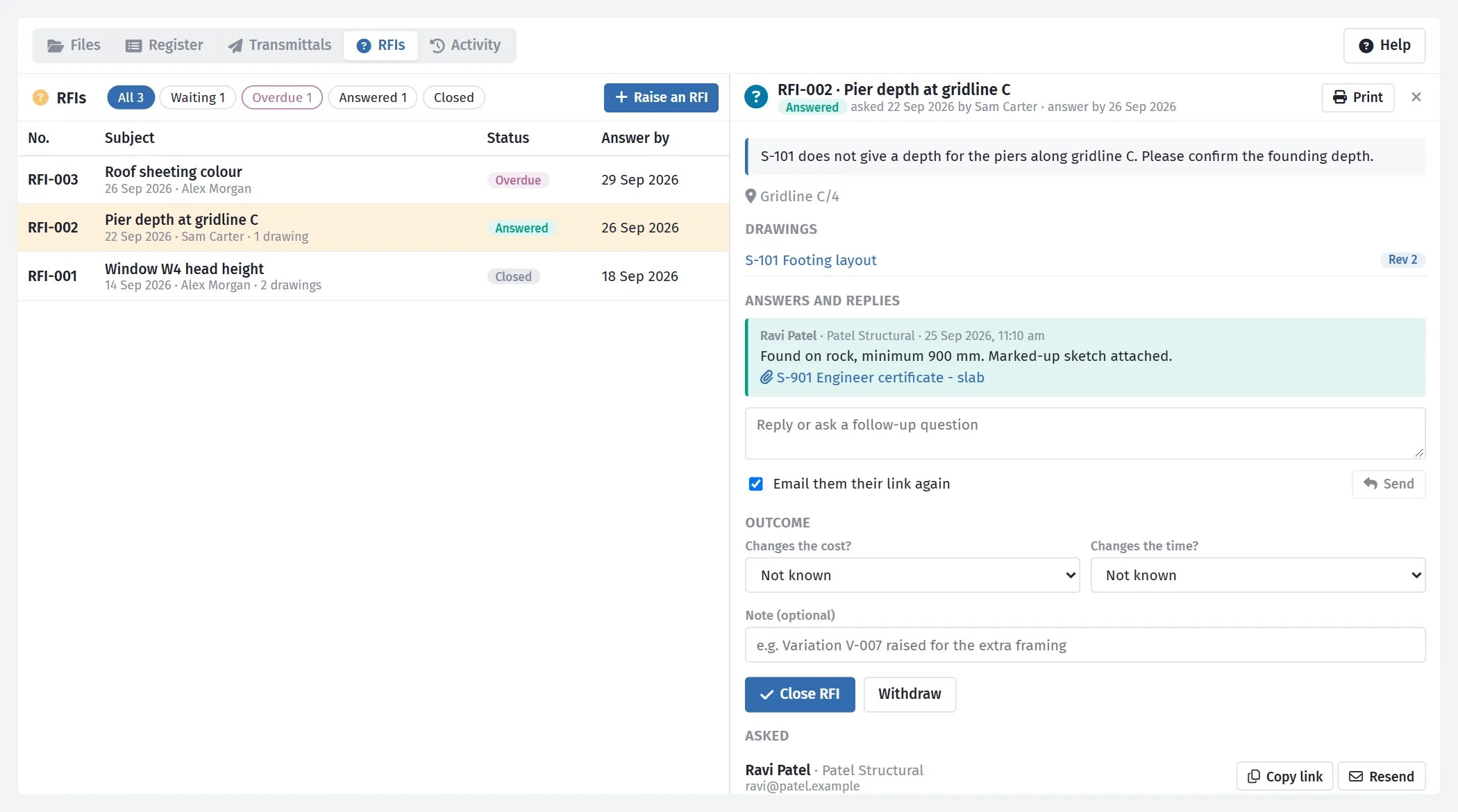
The list shows every RFI on the estimate, newest first. The buttons along the top narrow it:
| Button | Shows |
|---|---|
| All | Everything. |
| Waiting | Asked and not answered yet. |
| Overdue | Not answered and past its answer-by date - shown in pink. |
| Answered | Answered but not closed. |
| Closed | Closed or withdrawn. |
Click an RFI to open it. You see the question, the drawings, every answer and reply, and who was asked - with when each person opened their link, a Copy link button and Resend.
To ask a follow-up, type in the reply box and click Send. Tick Email them their link again to let them know.
Print makes a one-page copy of the RFI, its answers and its outcome - to save as a PDF or put in the site file.
Closing an RFI
Section titled “Closing an RFI”When the question is settled, record the Outcome:
- Changes the cost? - Not known, No or Yes.
- Changes the time? - Not known, No or Yes.
- Note - optional, e.g. Variation V-007 raised for the extra framing.
Then click Close RFI. If the answer is that the question no longer matters, click Withdraw instead. A closed or withdrawn RFI can be reopened.
Who can do what
Section titled “Who can do what”| To | You need |
|---|---|
| See RFIs | Access to the job’s Documents |
| Raise, reply, close | Permission to change documents |
Related
Section titled “Related”- Transmittals - formally issuing the drawings in the first place.
- Restricted folders, upload links and activity - every RFI raised, answered and closed is in the job’s activity record.