
Templates
Available onBuilder
A template is the list of questions. Runs are made from it; changing it afterwards never touches a run already done.
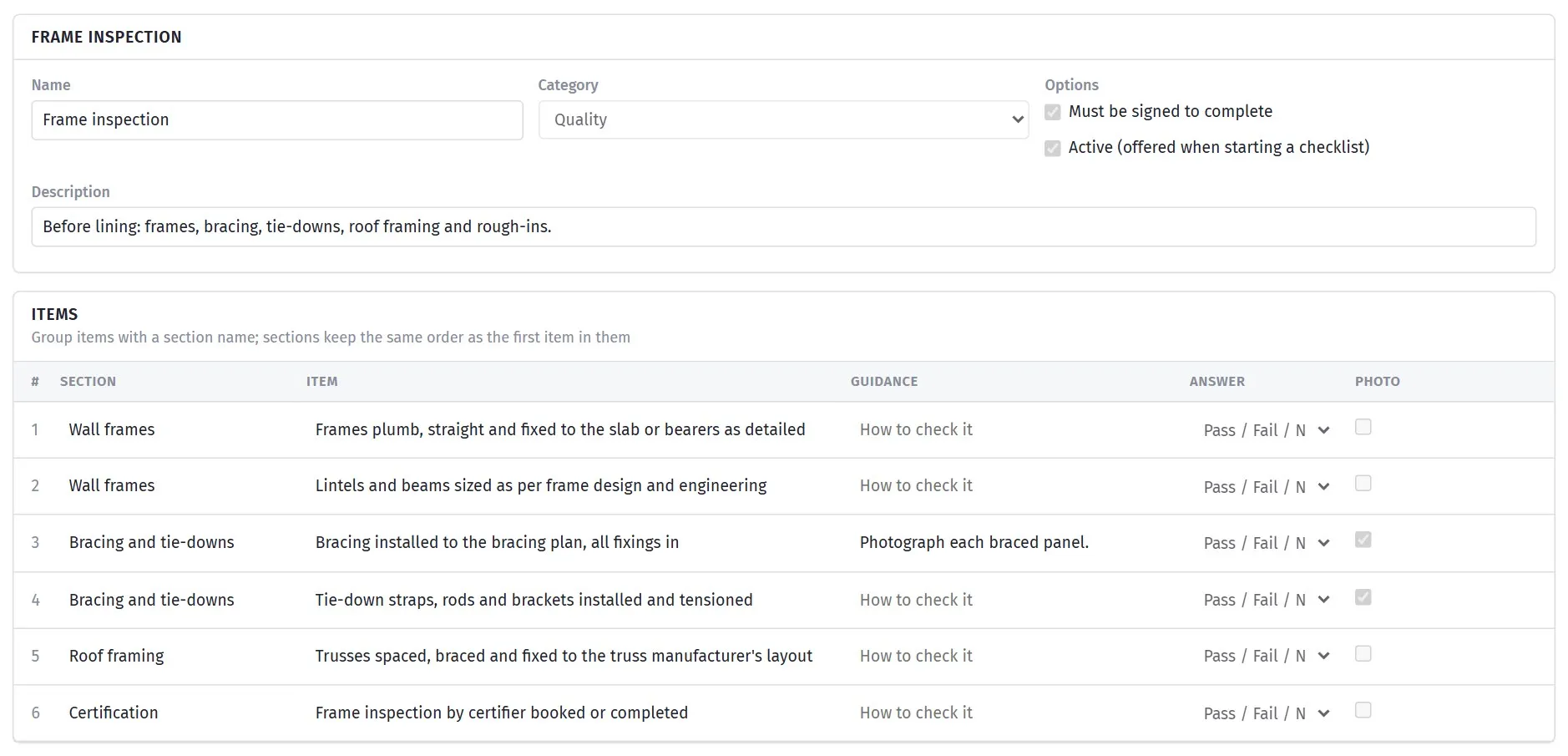
Write the template once and every job runs the same checks.
Starters and your own
Section titled “Starters and your own”The Templates tab shows two lists. SmarteBuild starters are ready to run and cannot be edited. Your templates are yours to change. Copy on a starter puts an editable copy in your list, which is the usual way to begin: copy the frame inspection, add the three things your certifier always asks for, and save.
The fifty-nine starters cover a residential job stage by stage, from the site survey to the keys, plus the safety permits and pre-starts that go with each stage:
| Category | Starters |
|---|---|
| Quality (33) | Existing structure survey (renovation) · Site establishment · Demolition and strip-out · Excavation and footings · Termite management · Pre-slab inspection · Pre-pour (suspended slab, retaining wall, structural concrete) · Structural steel and posts · Frame inspection · Pre-roofing inspection · Roof covering completion · Roofing and external · Brickwork and masonry · Windows and external doors · External cladding and wrap · Lock-up inspection · Electrical rough-in · Plumbing and gas rough-in · Air conditioning and mechanical rough-in · Insulation and pre-sheeting · Pre-lining inspection · Plasterboard and cornice completion · Wet area waterproofing · Tiling inspection · Kitchen and joinery installation · Painting inspection · Carpentry fit-off (second fix) · Electrical and plumbing fit-off · Fix-out and finishes · Driveway, paths and external concrete · Landscaping, fencing and site finish · Final clean · Pre-handover inspection |
| Handover (4) | Client walk-through and defect list · Practical completion · Keys, documents and warranties handover · Maintenance period inspection |
| Safety (17) | Site induction and SWMS sign-on · Toolbox talk · Weekly site safety inspection · Scaffold inspection · Ladder and mobile scaffold check · Roof work and edge protection · Working at heights permit · Excavation and trench safety · Electrical safety on site · Hot works permit · Subfloor, roof space and confined access · Manual handling and material delivery · Wet weather and storm response · Heat and UV work plan · Public safety and traffic · Asbestos and hazardous materials · Site emergency preparedness |
| Pre-start (5) | Daily pre-start · Plant and equipment pre-start · Elevated work platform (EWP) pre-start · Concrete pump and pour pre-start · Crane and lifting pre-start |
Two names to know: Insulation and pre-sheeting is the last look before plasterboard (what some sites call the pre-sheeting or pre-plaster inspection) and Pre-lining inspection is its shorter cousin from the earlier set; run whichever suits your certifier. Scaffold safety is Scaffold inspection (the licensed scaffolder’s handover and the weekly check) with Ladder and mobile scaffold check for the everyday kind.
Adding an item while running a checklist
Section titled “Adding an item while running a checklist”A template never thinks of everything. On a checklist in progress, Add an item to this checklist at the foot of the items adds a question to that run only: name the section, write the question, pick the answer type, mark it photo-required if it is.
If the checklist was started from one of your own templates, tick Also add to the template and the next run asks it too. Starters cannot be changed this way; copy the starter first and run from the copy.
An item that has not been answered, noted, photographed or turned into a defect can be removed from the run with the cross beside it.
An inactive template is kept but no longer offered when starting a checklist. Use that rather than deleting a template that has been run.
Writing items
Section titled “Writing items”Each item is one question. Fields:
| Field | What it does |
|---|---|
| Section | Groups items under a heading. Items with the same section name sit together, in the order of the first one |
| Item | The question. Write it so the answer is Pass or Fail: Bracing installed to the bracing plan, all fixings in, not Bracing |
| Guidance | How to check it, or what to photograph. Shown under the item while answering |
| Answer | Pass / Fail / N/A for inspections; Yes / No / N/A for sign-ons and pre-starts; Text or Number for a value, such as a test result or an installer’s name |
| Photo | Tick it and the checklist cannot be completed until that item has a photo (unless it is N/A) |
Must be signed to complete on the template makes at least one signature compulsory. Turn it on for anything a third party relies on: inspections, handover, sign-on lists.
Which items should require a photo
Section titled “Which items should require a photo”The Photo tick is the most useful setting on a template, and the most commonly overused.
Require it on anything that gets covered up and cannot be re-inspected later without demolition — reinforcement before a pour, waterproofing before tiling, frame tie-downs before linings. Those are the items that would otherwise cost you an argument you cannot win.
Do not require it on everything. Twenty mandatory photos turns a five-minute check into a twenty-minute one, and people start photographing the floor to get past it — which is worse than no photo, because it looks like evidence.
Ordering sections for the walk
Section titled “Ordering sections for the walk”Items with the same Section name sit together, so sections are effectively the route somebody walks.
Order them by where the person will be standing, not by trade. A checklist ordered Roof, Upper floor, Ground floor, External is walked once. The same items ordered Structural, Waterproofing, Services, Finishes sends them up and down the stairs four times, and the last section gets rushed.
Keeping templates current
Section titled “Keeping templates current”Copy an existing template rather than starting from scratch when you need a variant.
Review them when something changes: a code change that adds a requirement, an incident that revealed a gap, a subcontractor who keeps making the same mistake. A checklist that never changes is usually one nobody reads.
Make a template inactive rather than deleting it once it has been run — the runs stay, and it stops being offered.
Categories
Section titled “Categories”Quality, Safety, Handover and Pre-start. They group the templates when starting a checklist and filter the list of runs; they do not change how a checklist behaves.