
Sending defects to a supplier
Available onBuilder
A defect list is only useful once the trade who has to fix it has it. Notify supplier on the Defects page sends one email to one supplier listing their open defects on the job, with a link to a page where they see each item with its photo and tell you when it is done.
Sending a notice
Section titled “Sending a notice”On Defects, click the button. The dialog lists every supplier with open defects on this job, with how many have never been sent and how many are overdue for a chase. Pick the supplier, and:
- Send to is filled from the supplier’s reps (start typing to pick another, or type an address). You are always CC’d, so a reply comes to you.
- Rectify by puts a date in the email. Optional, but a date is what gets a trade out.
- Message is your own line above the list: “handover is Friday”, “call before you come”.
- Tick the defects to include. Only unsent / to chase ticks the ones that have never been sent or were sent more than a week ago with no answer - the usual Monday selection.
The email carries the list (tag, where, what, when raised) and a button to their page. Photos are on the page rather than attached: a few phone photos would bounce at most mail servers.
A defect with no supplier cannot be sent anywhere; the dialog tells you how many there are. Edit the defect and set the supplier.
What the supplier sees
Section titled “What the supplier sees”The link opens a page that needs no login and works on a phone: the job address, your message and the rectify-by date, then each defect with its photo. Under each one:
- Mark as fixed - their name, an optional note and an optional photo of the finished work. It shows on your side as Supplier says fixed until you check it.
- Not ours / dispute - their name and the reason. It shows as Disputed.
They can change an answer later. Nothing they do closes the defect: that is yours to do once you have looked.
Knowing what happened
Section titled “Knowing what happened”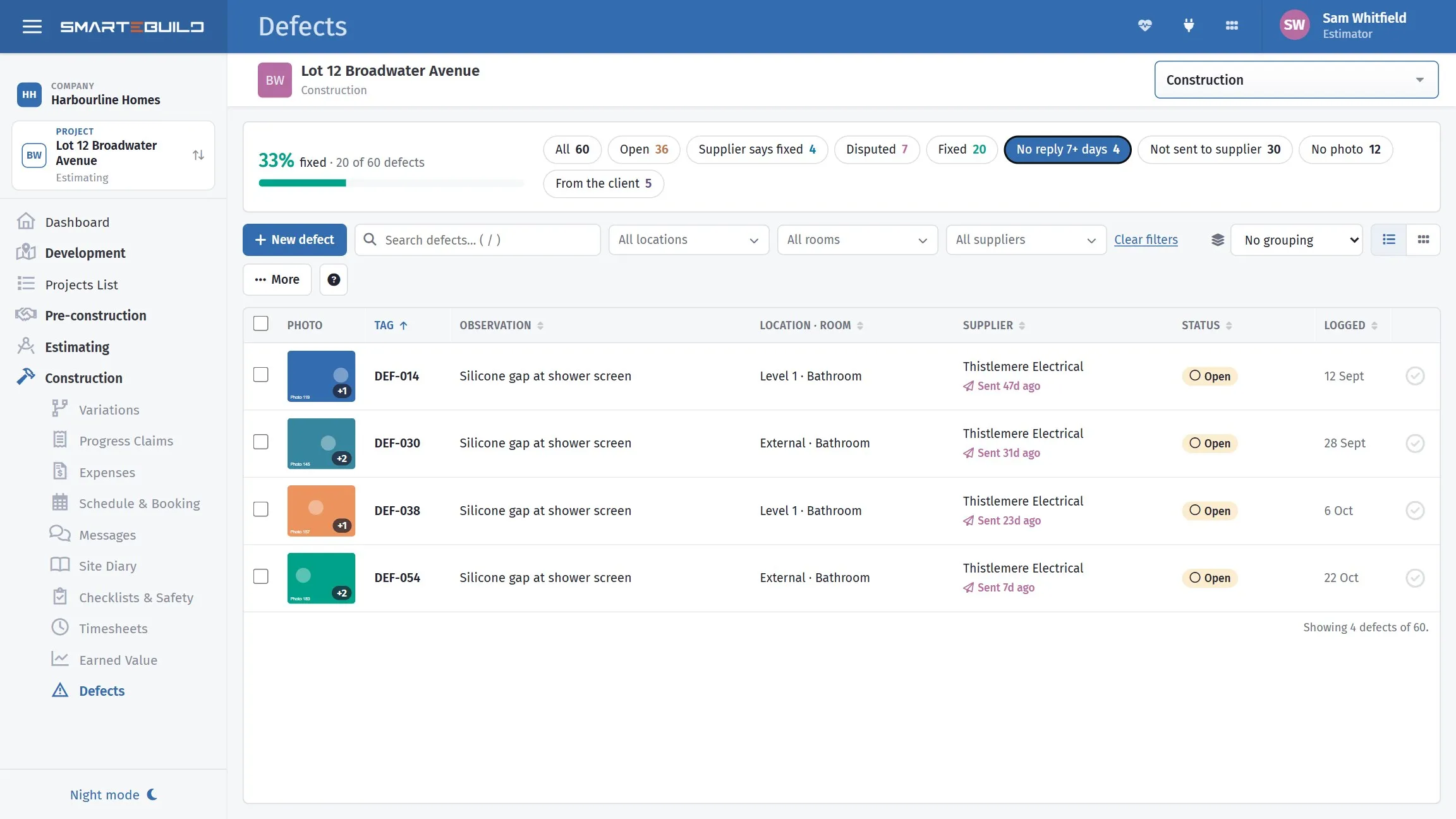
The No reply 7+ days chip is the chasing list. Each row says how long ago the notice went — 47 days on the first one, which is a phone call rather than another email.
Open a defect and its Supplier notices section lists every notice sent for that one item: who sent it, when, whether it was withdrawn, and the supplier’s answer — their note, the date, and the photo they took.
To see it the other way round, the filters narrow the whole list: Not sent to supplier is the one to run before a site visit, and Supplier says fixed is the queue waiting on you to check. Group by supplier to see one trade’s position in one place.
Notices sent & replies, on the ⋮ menu, opens every notice sent on the job: who, when, whether the link has been opened (and when), how many items they say are fixed, disputed, closed or still open. Open one to see the items with their responses and photos, and:
- Accept & close on an item the supplier says is fixed, once you have checked it. That ticks the defect as Fixed and records who accepted it.
- Send reminder re-sends the same link listing only what is still open. Each reminder is counted and dated.
- Open their page / Copy link to see what they see, or to text the link to a foreman who does not read email.
- Withdraw link if a notice went to the wrong person. The defects keep their history.
From the phone
Section titled “From the phone”The mobile app can send a notice, see the notices on a job and send a reminder from site - useful when the trade is standing next to you. See The mobile app on site.